335
3-4. Using the hands-free phone system (for cellular phone)
3
Interior and exterior features
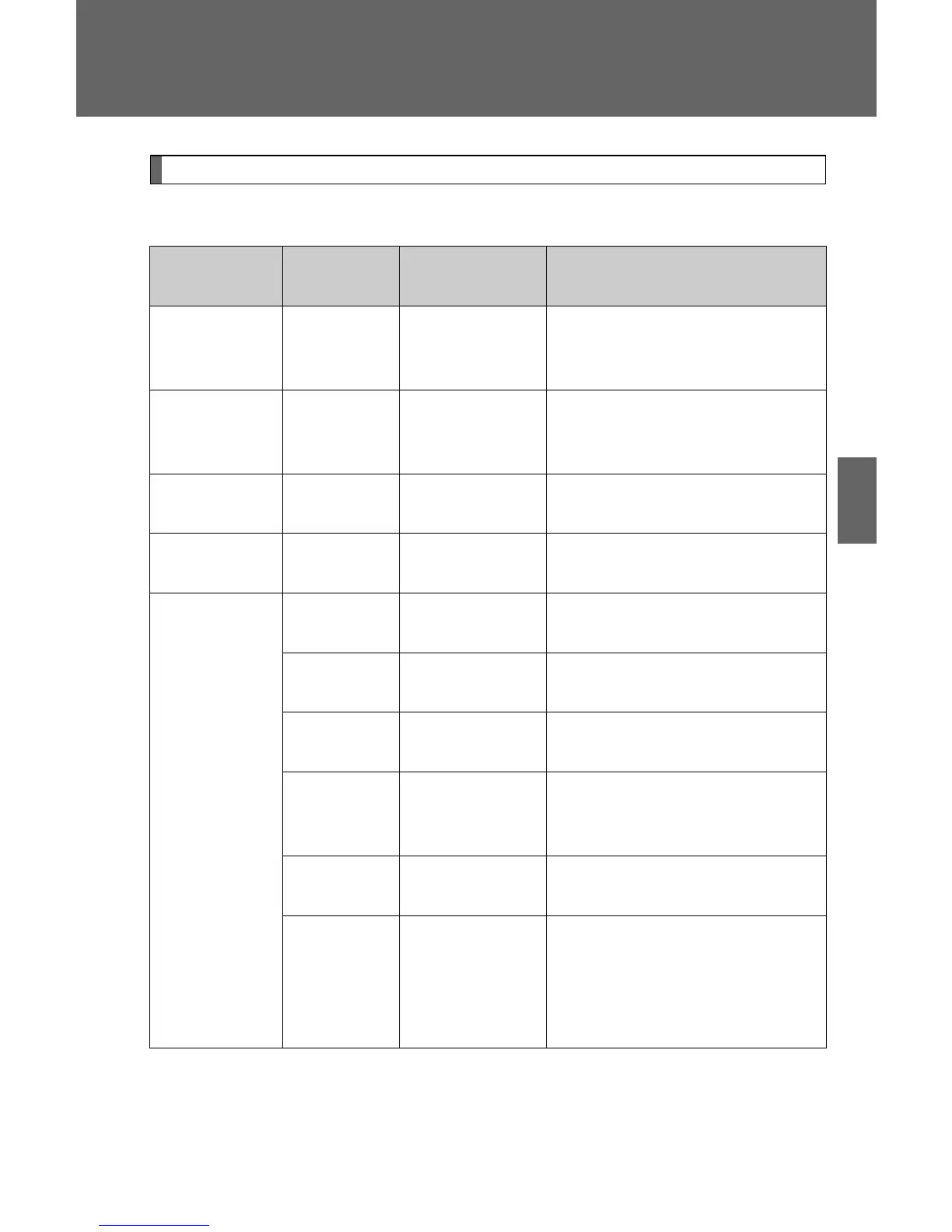
Menu list of the hands-free phone system
■ Normal operation
First menu
Second
menu
Third menu Operation detail
“Callback” - -
Dialing a number stored in
the incoming call history
memory
“Redial” - -
Dialing a number stored in
the outgoing call history
memory
“Dial by
number”
- - Dialing by inputting a number
“Dial by
name”
--
Dialing by inputting a name
registered in the phone book
“Phonebook”
“Add
Entry”
- Adding a new number
“Change
Name”
-
Changing a name in the
phone book
“Delete
Entry”
- Deleting the phone book data
“Delete
Speed
Dial”
-
Deleting a registered speed
dial
“List
Names”
- Listing the phone book data
“Set
Speed
Dial”
(Speed
Dial)
- Registering a speed dial


 To Next Page
 Loading...