Troubleshooting
2001989-203C ApexPro™ Telemetry 6-11
The Temperatures diagnostics page displays real-time ATS internal temperature
information. Temperatures must be between the High- and Low Limit levels
displayed.
NOTE
If an error message displays, View hardware environmental parameter data
via BIOS settings on page 6-11.
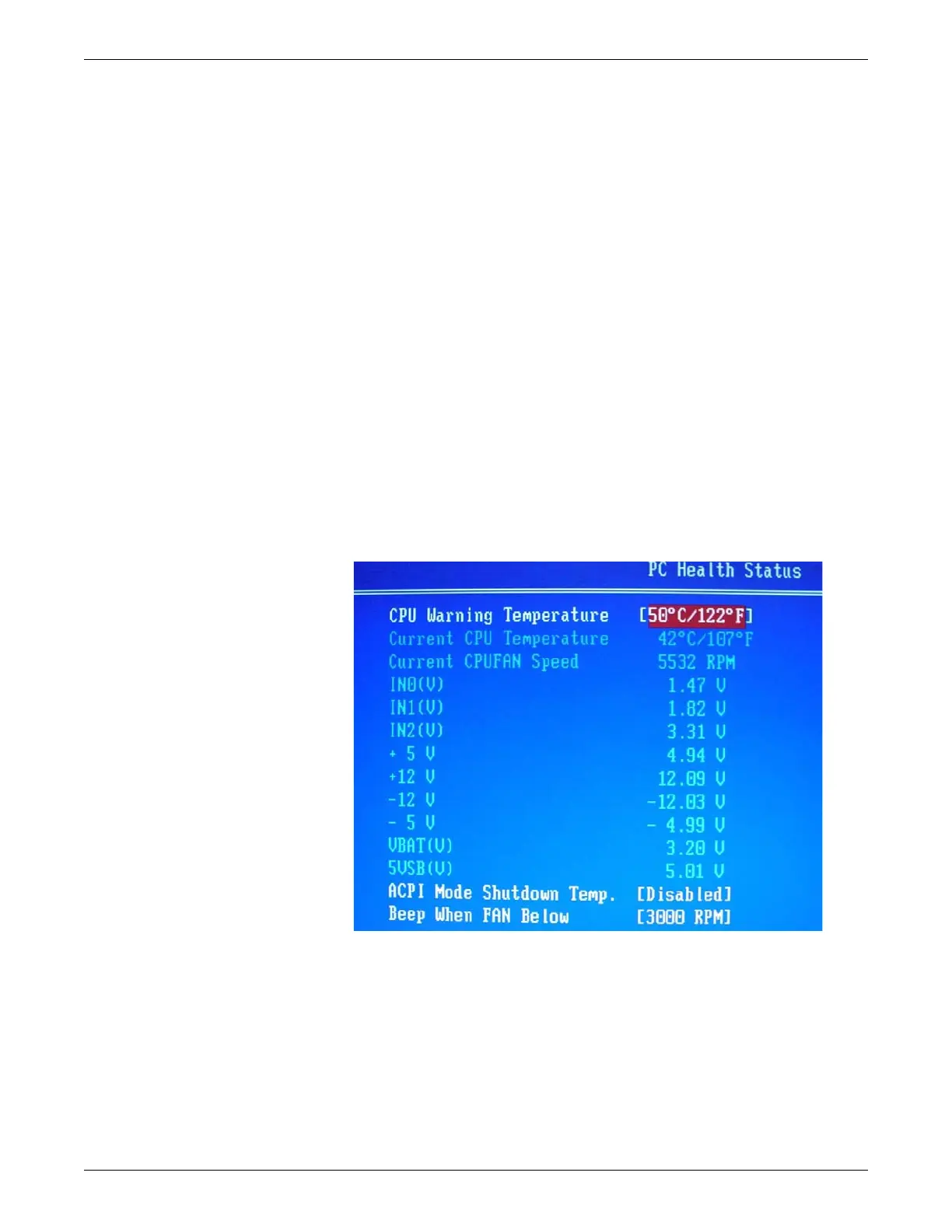
View hardware environmental parameter data via BIOS settings
In Webmin, if you are unable to view the hardware status on fan speed, power, or
temperature, you can alternatively view the information via the BIOS settings.
1. Log off Webmin.
2. Follow the instructions for Safe shutdown/restart of the ATS on page 6-21.
3. Restart the system. While the system is starting up, press the Del key until the
Advanced BIOS Features screen displays.
4. Navigate to PC Health Status.
5. Note the fan speed, power, and temperature information on the PC Health Status
screen.
601A
Network diagnostics
Adaptors - Display adaptor and serial port information
1. Log onto the Webmin service interface on page 4-7.
2. Select the Diagnostics tab.


 To Next Page
 Loading...