1. SYSTEM INTRODUCTION
1-5
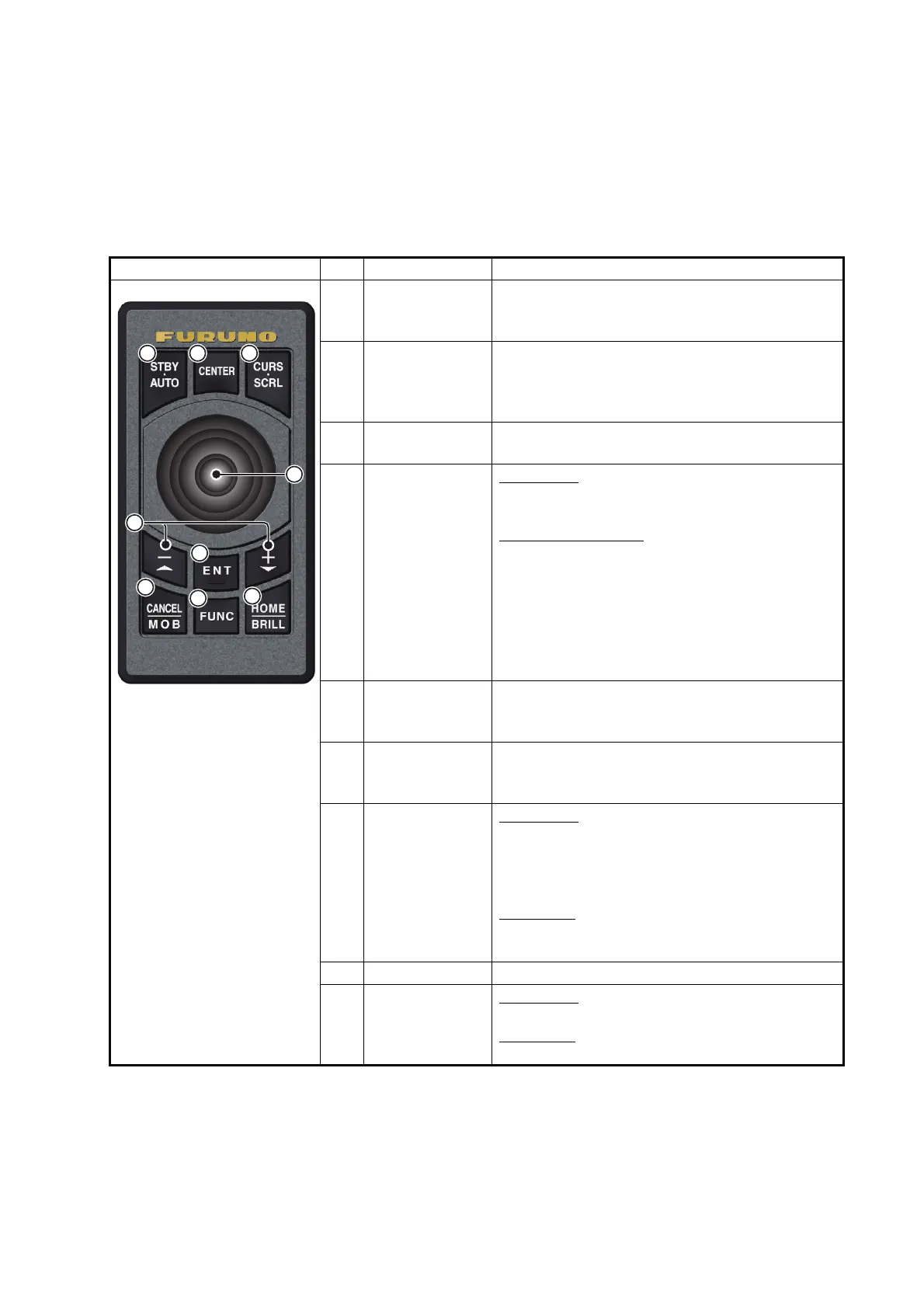
1.2 Remote Control Unit (option)
The Remote Control Unit MCU-002 or MCU-004 lets you operate the system without
touching the screen. When the power is applied and a Remote Control Unit is connect-
ed, an orange cursor (selection cursor) marks current selection in menus.
1.2.1 Remote Control Unit MCU-002
* When you switch the steering mode with the STBY•AUTO key, a beep sounds and
then one of the messages shown below appears. The message does not appear on
the home screen.
- STBY modeAUTO mode: "NAVpilot is engaged."
- AUTO modeSTBY mode: "NAVpilot is disengaged."
No. Key Function
1 STBY•AUTO
key
Switches the steering mode of the FURUNO
NAVpilot-700 series Autopilot between the
STBY and AUTO modes*.
2 CENTER key • Returns own ship to the center of the screen
(Plotter/Weather/Radar display).
• Cancels the echo history (Fish finder dis-
play).
3 CURS•CRL
key
Switches the joystick gesture between the cur-
sor mode and scroll mode.
4 Joystick Short push
: Works same as tap gesture.
• Opens the pop-up menu.
• Activates the item selected by the cursor.
Operate the joystick
:
Cursor mode operation:
• Moves the cursor.
Scroll mode operation:
• Pans the display (Plotter/Weather/Radar dis-
play).
• Shifts the range and scrolls back the picture
(Fish finder display).
5 +, - key • Selects an item from the slide-out/main/pop-
up menu.
• Zooms in (+) and out (-).
6 ENT key • Activates a selected item.
• Swipe function: Opens the slide-out menu,
[Layers] menu, data area, quick page
7 CANCEL/MOB
key
Short push
:
• Closes the menu or dialog box.
• Stops the aural alarm.
• Ends the tool mode (End Route, End Move,
etc.).
Long push
• Enters the MOB mark (at the own ship’s po-
sition).
8 FUNC key Does the function set at [Function Gesture].
9 HOME/BRILL
key
Short push
:
• Opens the home screen.
Long push
:
• Opens the [Power & Brilliance] window.


 To Next Page
 Loading...









