12. AIS, DSC MESSAGE
12-4
12.7 How to Display an AIS Safety Message
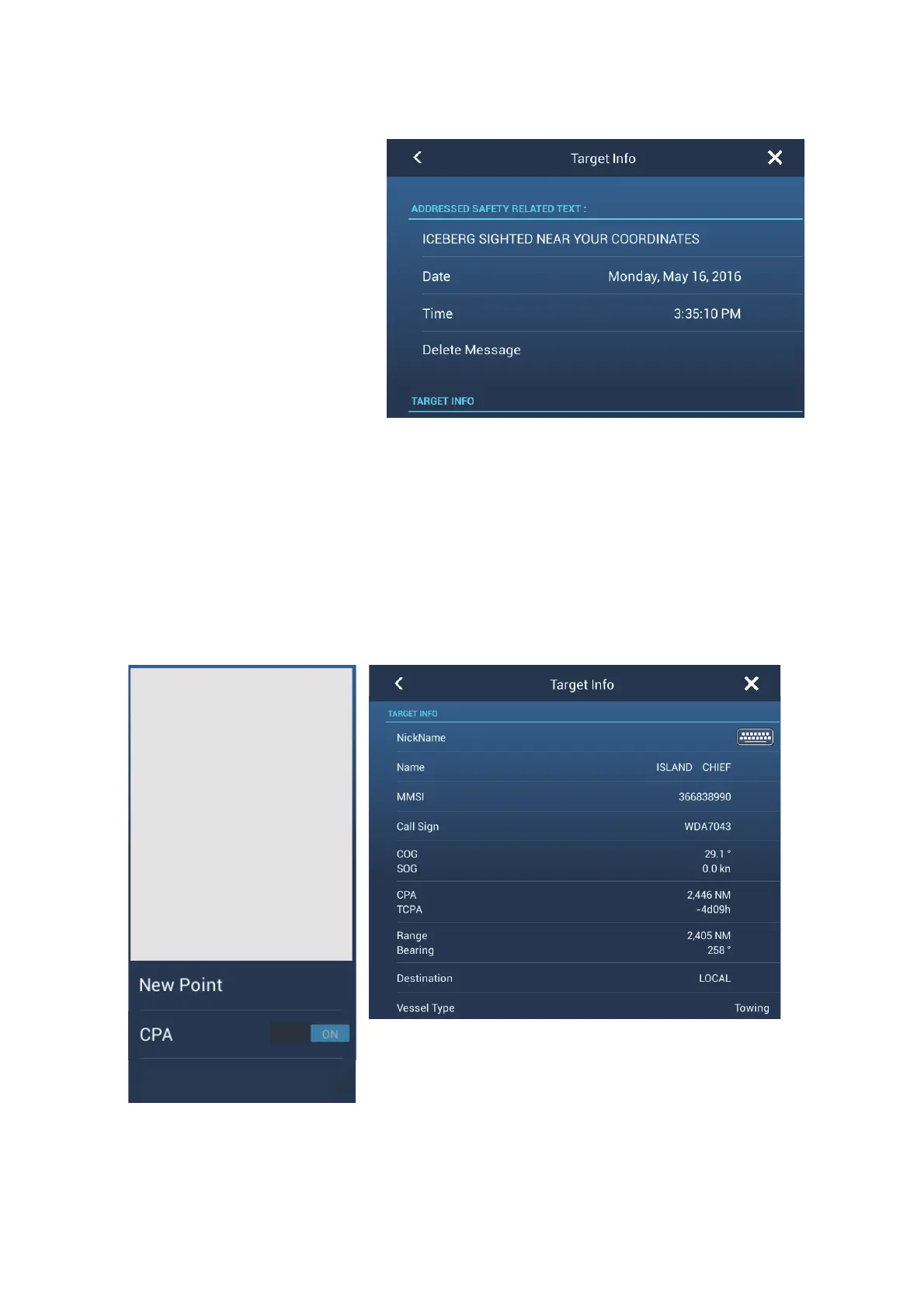
When you receive an AIS
safety message (ad-
dressed or broadcast) from
an AIS transponder
equipped vessel, the Sta-
tus bar displays "New
Safety Related Mes-
sage(s)" flashing. Tap the
Status bar to display the
message. The AIS symbol
for the vessel that transmit-
ted the message is put at
the center of the screen
and a pop-up window ap-
pears, showing the AIS safety related message. You can delete the message by tap-
ping [Delete Message].
12.8 How to Display AIS Target Data
Tap an AIS target (plotter or radar display) to display the simple information in the pop-
up menu.
For detailed information, tap the target, then tap [Info] on the pop-up menu to show the
[Target Info] window.
Detailed information
Simple information
GALE WARNING 27.16N 82.40W
Name FURUNO
MMSI 124365890
COG 342.0°
SOG 0.0 kn
Range 7.293 NM
Bearing 325.2°
CPA 5.992 NM
TCPA -41’30s
Last Update 30’42s
Info



 To Next Page
 Loading...









