13. OTHER FUNCTIONS
13-10
13.6 How to Manage Your Charts
The NavNet TZtouch2 uses the same Mapmedia charts as NavNet 3D. Even though
NavNet TZtouch2 is a master-less system in networking, for charts one NavNet
TZtouch2 unit should be set as Chart Master to share the System ID, which will be
necessary to obtain an unlock code of a chart from Mapmedia.
13.6.1 How to view your charts
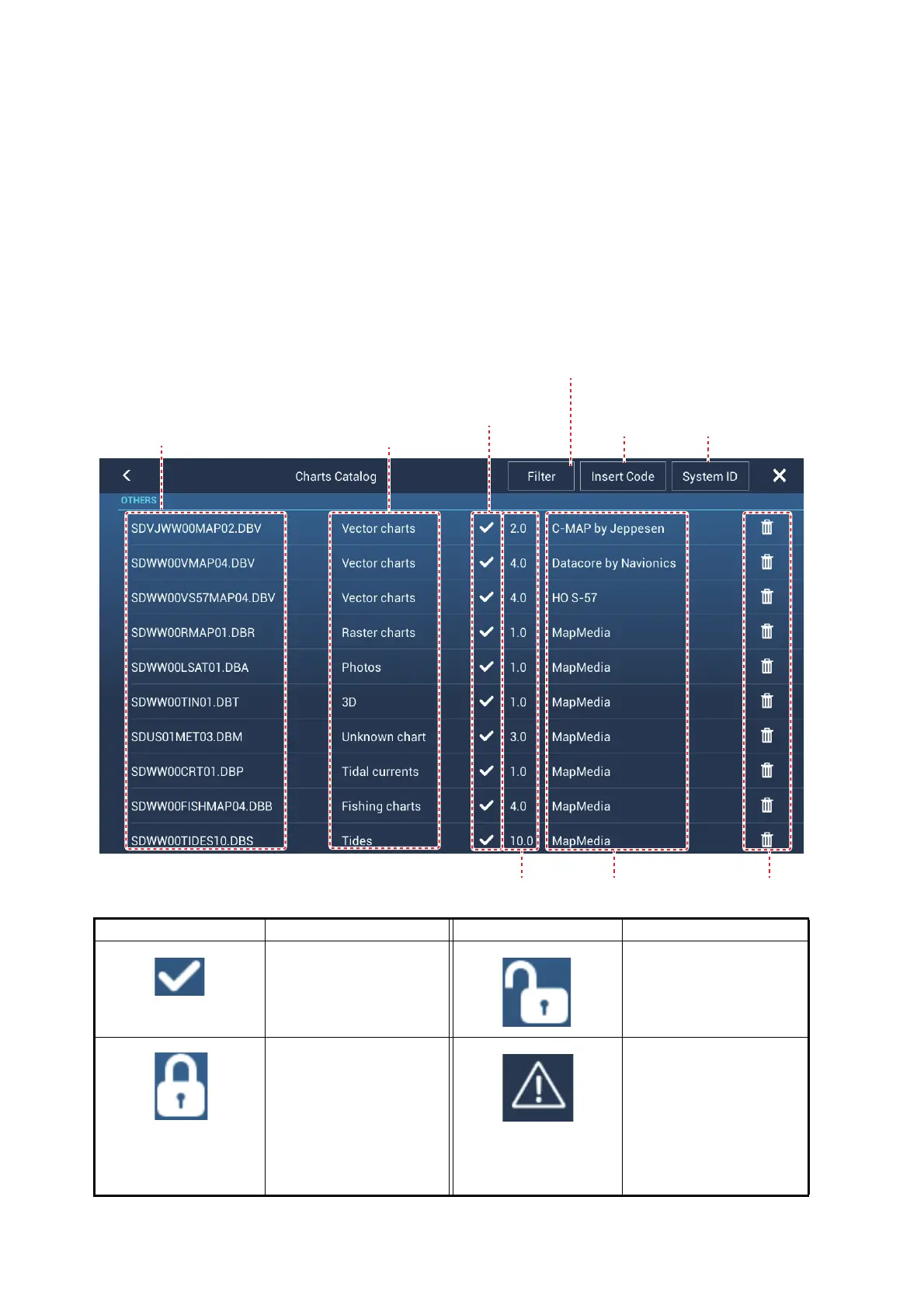
Tap the Home icon to show the home screen, then tap [Catalog] to display your charts
catalog.
Chart status icon Meaning Chart status icon Meaning
Free chart. An unlock
code is not necessary.
Unlock code entered.
Unlock code is neces-
sary to use the chart.
Tap the [Insert Code]
button at the top of the
[Charts Catalog]
screen. Enter the un-
lock code then tap to
finish.
Chart cannot be used
because it is corrupted.
System ID
display
Tap to enter
unlock code
Chart manufacturer
Chart file name Chart file type
See table
below.
Tap to show [FIlter
charts] pop-up menu.
Chart version no. Trash icon











 To Next Page