CHAPTER 5 DISASSEMBLY AND RE-ASSEMBLY
Confidential
5-50
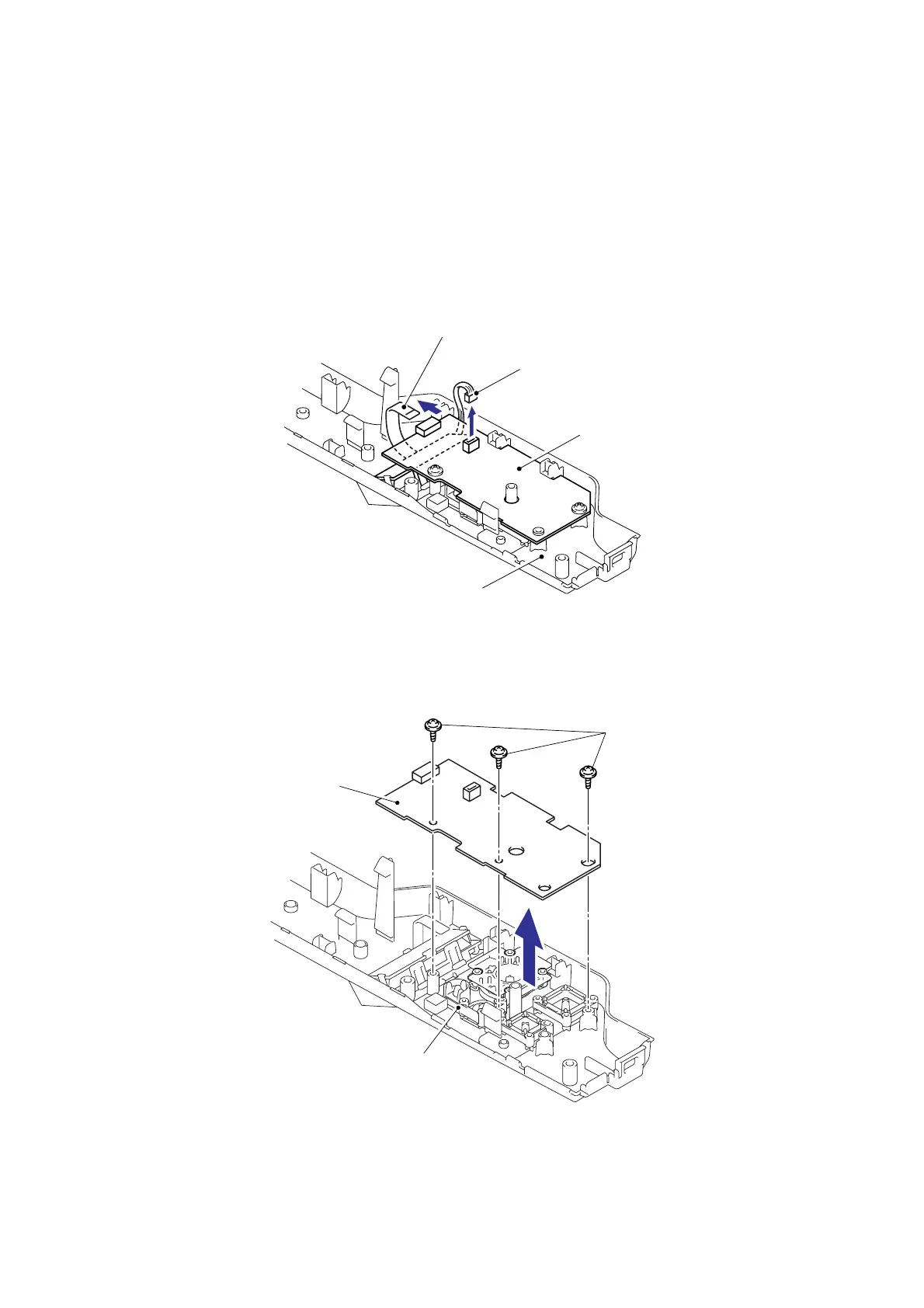
7.28-3 Panel PCB ASSY
(1) Disconnect the LCD panel PCB harness and Back light PCB harness from the LCD panel
PCB ASSY.
NOTE:
- After disconnecting the flat cable(s), check that each cable is not damaged at its end or
short-circuited.
- When connecting the flat cable(s), do not insert it at an angle. After insertion, check that
the cable is not at an angle.
Fig. 5-72
(2) Remove the three cup B M3x8 Taptite screws, and then remove the LCD panel PCB
ASSY.
Fig. 5-73
Assembling Note:
When assembling the LCD panel PCB ASSY, secure the screws according to the order of
alphabet described in the figure above.
Taptite, cup B M3x8
LCD panel PCB ASSY
Top cover 2 printed ASSY
LCD panel PCB ASSY
Back light PCB harness
LCD panel PCB harness (Flat cable)
Top cover 2 printed ASSY
a
b
c


 To Next Page
 Loading...