DS1067-062C 43 LBT20063
4 ALARMS, EVENTS AND INDICATIONS
This chapter contains a detailed description of the alarms, events and indications managed by 1067/024, 1067/032A and
1067/052A.
4.1 ALARM AND EVENT INDICATIONS
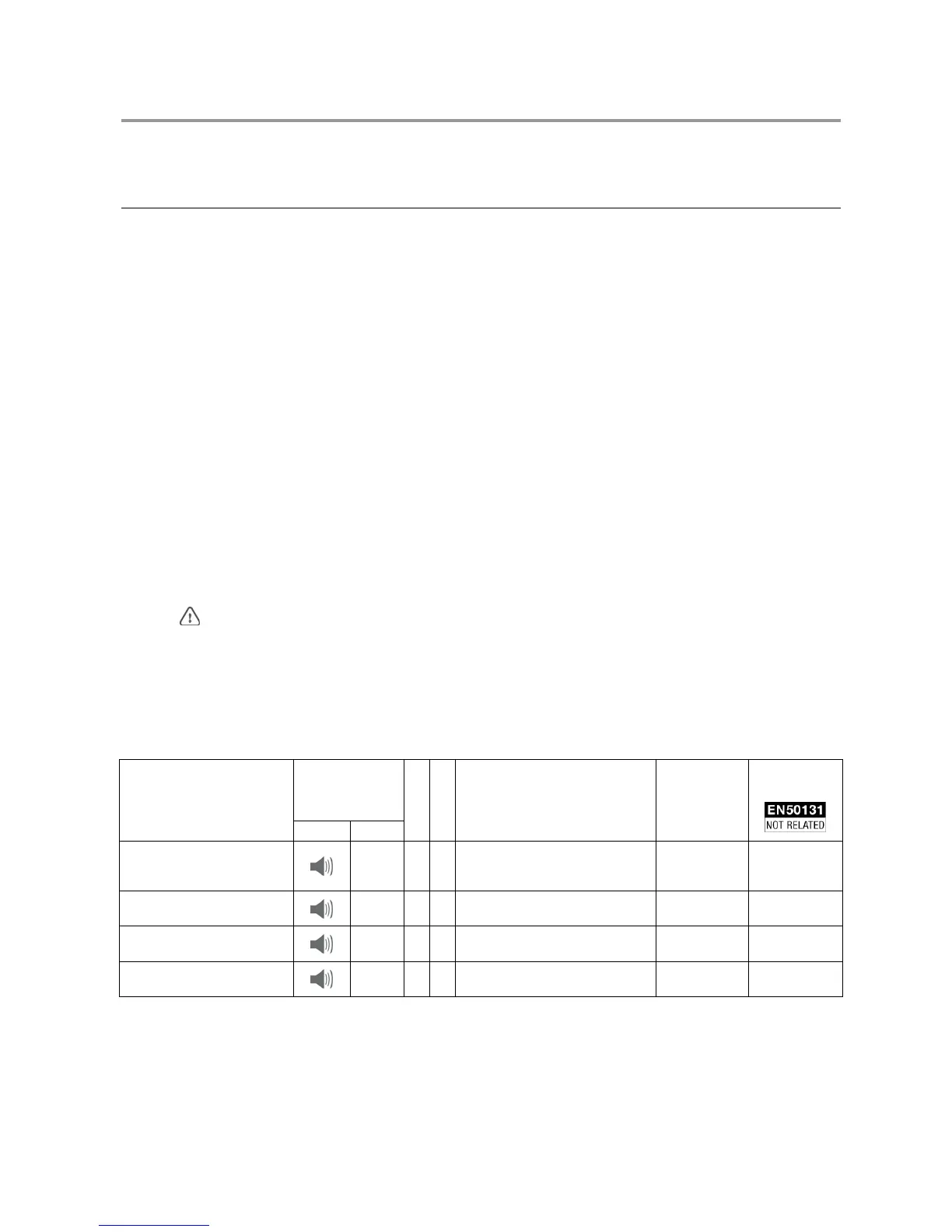
The following table contains a summary of the various indications (LEDs, outputs, messages, memory records) which are
activated in case of alarm or when an event occurs. The following paragraphs contain a detailed description of what an
alarm or event implies.
4.1.1 How to use the table
The control panel may record and indicate an occurrence (i.e. an alarm, an indication or an event) in many ways. The
indication or message is provided to allow to determine the causes.
Proceed as follows in case of indication on the keypad LED or the red LED of the key reader or if a telephone message is
received:
1) Search for the indication or message in the corresponding columns of the table.
2) Read the reason for the indication or message in the "Cause" column on the same line. An indication or message may
sometimes have several causes. In the latter case, it could be useful to read the description shown in the Event Log or
in the Diagnose Log.
The following abbreviations may be used in the Event Log and in the Diagnose Log:
• In or IN identifies an input
• TS identifies a keypad
• DD dentifies another type of device (for example LT – ER) .
The supplementary auxiliary indications can set up during system installation by connecting indicating devices (warning
lights, blinkers, bells, buzzers etc.) to outputs specifically programmed to be activated when a given event occurs.
4.1.1.1 Example of how to interpret the table
The LED
may light up for several different reasons. Read the Event Log or Diagnose Log (see paragraph 2.14.8 How
to examine the fault and anomaly memory) to determine the cause of the indication more in detail.
For example, the message LOW BATTERY CONTROL PANEL means that the control panel battery is not completely flat.
Then, go to section 4.2 Description of alarms and indications, and paragraph 4.2.18 Control panel and other device low
battery alarm, which contains a detailed explanation of what happened and what could happen.
The "Description of the event" column shows the message which appears on the first screen page on the first line and the
message which appears on the second screen page on the second line.
LED
Cause
Keypad Reader
Log
Memory
Description of the event
(Event Log and Diagnose Log)
Auxiliary
indication
(controlled
output)
Telephone
message
Burglar alarm
(immediate, delayed,
delayed way, last exit)
■ ■ ■
Inxxx:name
IN customisation
Burglar Burglar alarm
Burglar pre-alarm
■ ■ ■
Inxxx:name
IN customisation
Burglar Burglar alarm
Panic indication from input /
function key / remote control
■ ■ ■
“ TS xx” Panic Panic
Fire indication from input /
function key / remote control
■ ■ ■
“ TS xx” Fire Fire alarm


 To Next Page
 Loading...