1. Handling the touch panel
WARNING
T
o avoid personal injury or death:
• If the screen is damaged, replace it as soon as
possible. If the damaged screen is used, the
fragments may cause injury.
IMPORTANT :
• When cleaning the display screen, wipe with a
soft cloth like those used for cleaning
eyeglasses.
• Using a coarse cloth or rubbing too hard may
damage the surface.
• Cleaning the display screen with alkaline,
acidic, or organic solvents such as alcohol or
benzene can damage the screen.
• Do not press hard with your fingers or touch the
screen with pointed objects. Not following this
instruction may cause scratches or damage to
the screen.
NOTE :
• The touch panel is designed to be operated with
gloves, but operations may not be possible with
some types of gloves.
• Adherence of water droplets or sand to the
touch panel may cause malfunction or
operations may not be possible.
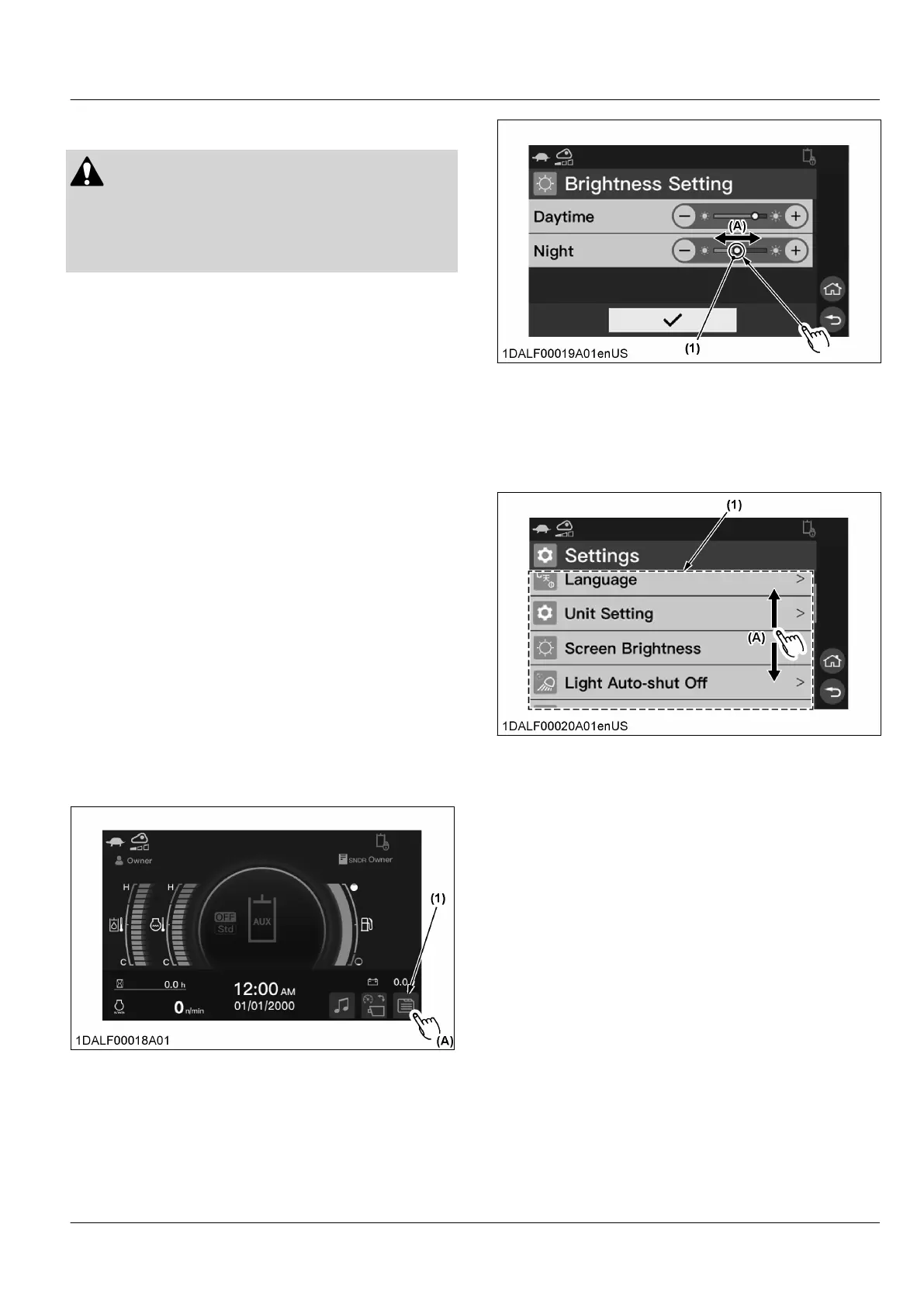
1.1 Basic procedure of the touch panel
Touch or tap
T
ouch or lightly tap an item on the screen. An operation
is performed or the following items are displayed.
(1) Item (A) Touch or tap
Slide
1.
Touch the slider bar on the touch panel.
2. While holding down your finger on the slider, move
to the required setting value.
(1) Slider bar (A) Slide
Scroll
While holding down your finger on the touch panel,
move up and down.
Items that are not displayed will be displayed.
(1) Screen (A) Scroll
Swipe
While
holding down your finger on the touch panel,
move up and down, left and right.
The home, rearview camera, audio and memo screens
can be swiped to switch screens.
(For more information, see REARVIEW CAMERA
MODE on page 80, Change to the audio screen on
page 81, and Switching to the memo screen on page
92.)
INSTRUMENT PANEL INSTRUMENT PANEL AND SWITCH


 To Next Page
 Loading...