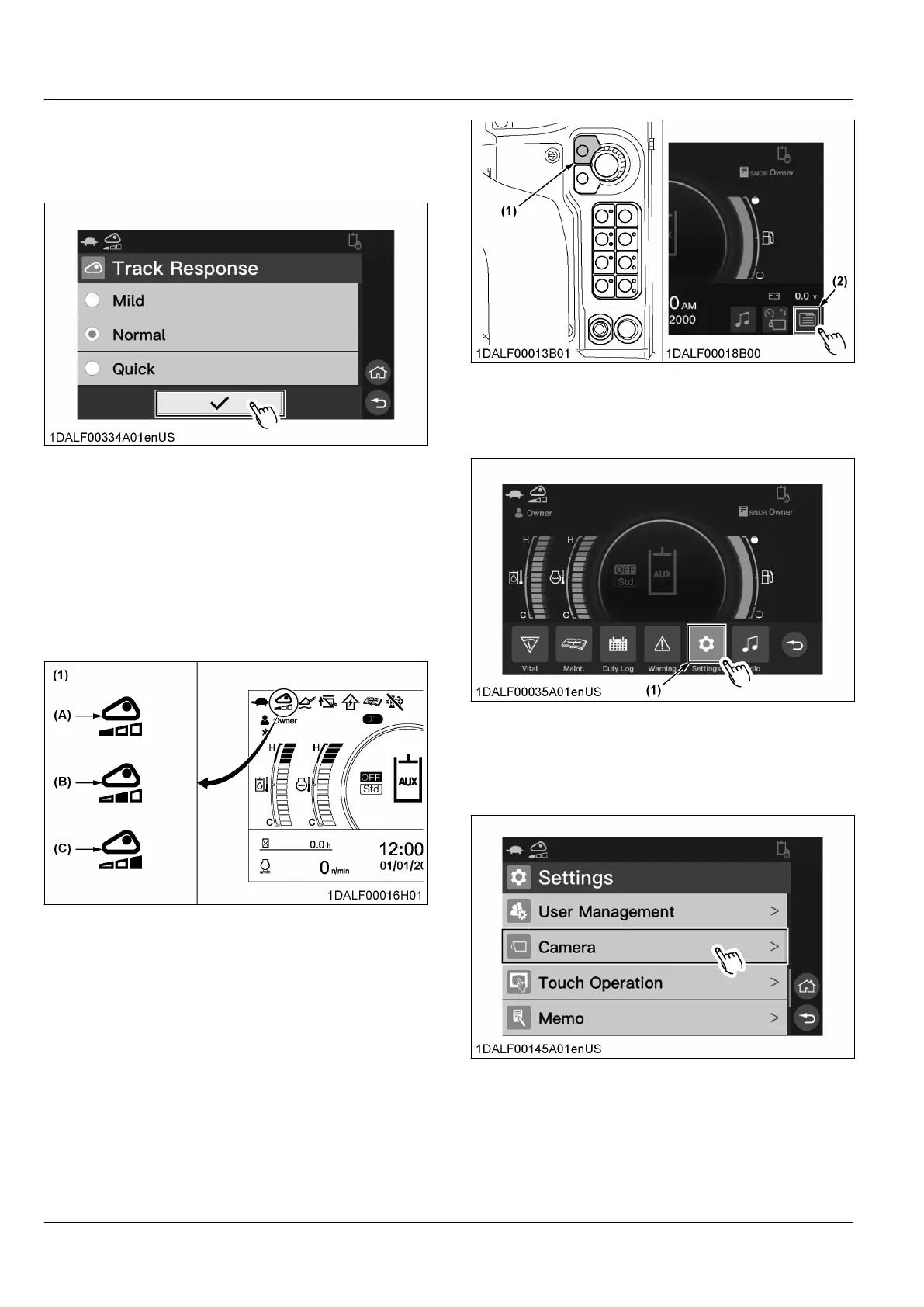
5. Rotate
the jog dial to select the icon [✔], and press
the jog dial switch.
For touch operation, touch the icon [✔].
The track response setting is activated.
NOTE :
• T
o retain the previous setting, press the
return switch.
For touch operation, touch the return button.
• If you touch the track response indicator on
the home screen, the track response setting
screen appears on the display.
• The track response indicator will change
according to the track response setting as
shown in the following figure.
(1) Track response indicator (A) Mild
(B)
Normal
(C) Quick
14. Setting the rearview camera
1. Press
the home switch or touch the menu icon to
make the menu bar appear on the display.
(1) Home switch (2) Menu icon
2. Rotate the jog dial to select the icon [Settings], and
press the jog dial switch.
For touch operation, touch the icon [Settings].
(1) Icon
3. Rotate the jog dial to select [Camera], and press
the jog dial switch.
For touch operation, scroll the display, and touch
[Camera].
Setting for switching to the rearview camera screen
1. Rotate
the jog dial to [Camera Setting], and press
the jog dial switch.
For touch operation, touch [Camera Setting].
INSTRUMENT PANEL AND SWITCH MACHINE SETTING


 To Next Page
 Loading...