2. Rotate
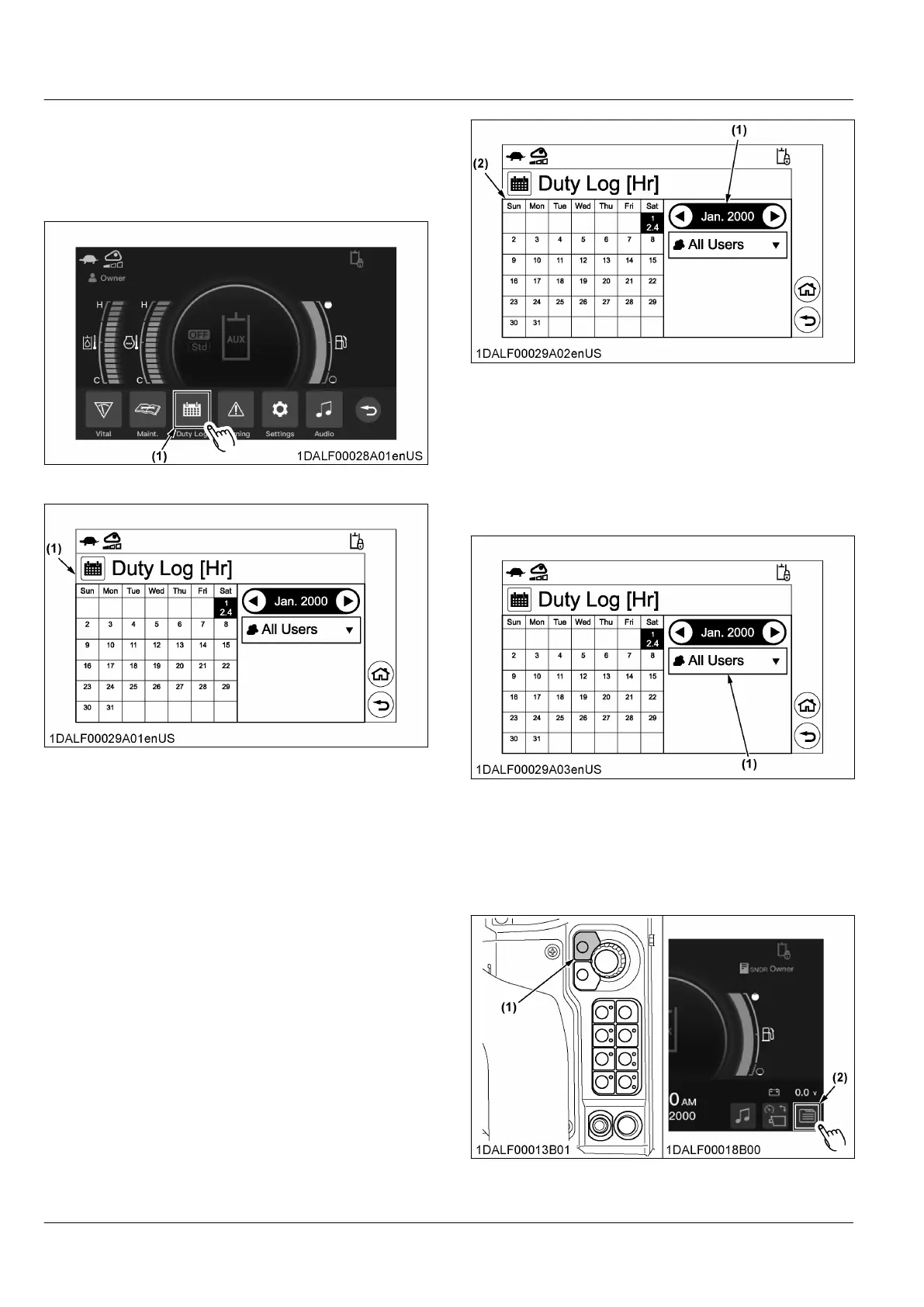
the jog dial to select the icon [Duty Log],
and press the jog dial switch.
For touch operation, touch the icon [Duty Log].
The the log record (the machine's operating day
and operating hours) for the current month appears.
(1) Icon
(1) Log record
3. T
o view records from previous months, rotate the
jog dial to select the year and month display area,
press the jog dial switch, rotate the jog dial to select
the desired month, and press the jog dial switch to
confirm the selection.
For touch operation, touch [◀] or [▶] of the year
and month display area, or swipe the calender
dislay area to left or right.
NOTE :
• It is possible to view records from the last
three months (up to 90 days ago).
(1) Year and month display area (2) Calender display area
4. T
o view records from other users, rotate the jog dial
to select the user display area, press the jog dial
switch, rotate the jog dial to select the desired user,
and press the jog dial switch to confirm the
selection.
For touch operation, touch [▼] of the user display
area, and touch the desired user.
(1) User display area
4. Checking error messages
1. Press
the home switch or touch the menu icon to
make the menu bar appear on the display.
(1) Home switch (2) Menu icon
INSTRUMENT PANEL AND SWITCH MACHINE SETTING


 To Next Page
 Loading...