SC-T7000 series/SC-T5000 series/SC-T3000 series Revision B
ADJUSTMENT Boards Related Checks and Adjustments 272
Confidential
4.14.3 MAC Address Input
EXECUTION MODE
Serviceman Mode
PROCEDURE
1. Connect the printer to the computer both with a USB cable and a network cable.
2. Turn the printer ON in the Serviceman Mode. Turn the power ON while pressing
[Menu] + [Back] + [OK].
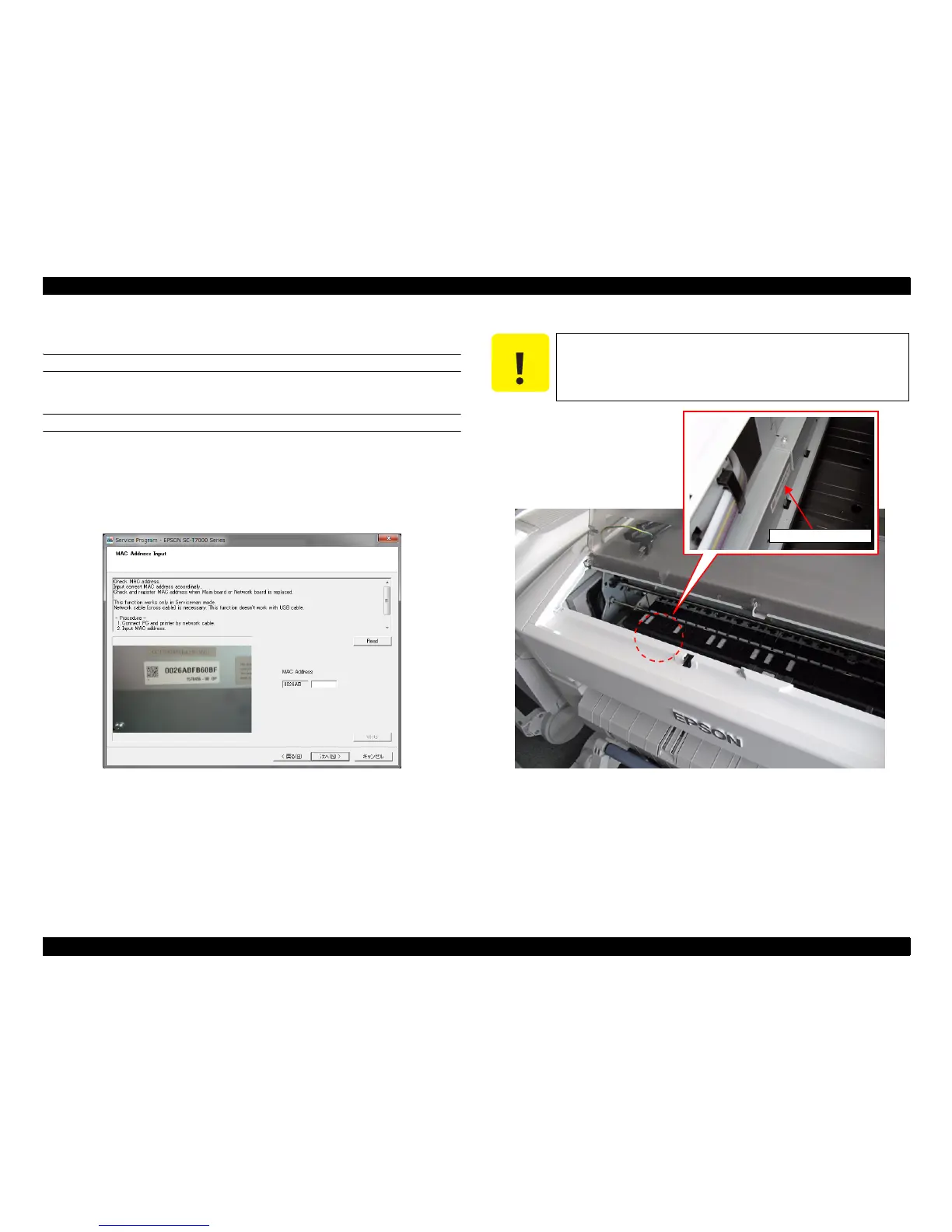
3. Start the Service Program and select MAC Address Input.
Figure 4-71. [MAC Address Input] Screen
4. Enter the MAC address indicated on the MAC address label attached on the rear of
the printer, and click [Write].
Figure 4-72. MAC Address Label
5. Click [Read] once.
The written MAC address is displayed in about two minutes.
6. Check that the address you entered and that displayed on the screen are the same.
7. Click [Finish].
8. Turn the printer OFF to finish the adjustment.
C A U T I O N
Click [Read] once. After waiting two and half minutes until the
network firmware is restarted, follow the procedure below.
MAC address label


 To Next Page
 Loading...