MFP Options
SM 2-115 D062/D063/D065/D066
Installation
Installation
1. Switch the machine off.
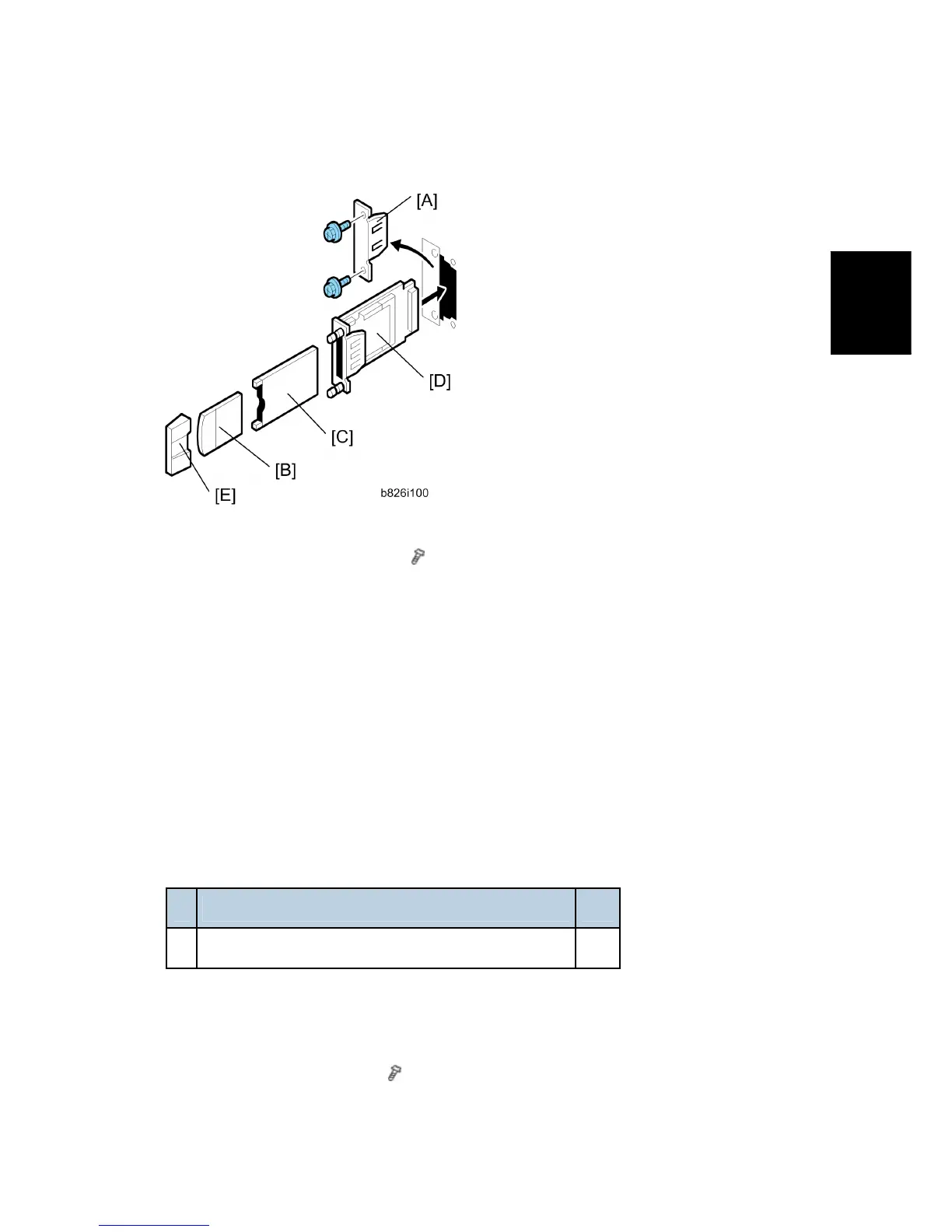
2. Remove the cover of Slot A [A] ( x2).
3. Touch a metal surface to discharge any static charge from your hands.
4. With both labels facing up, insert the Bluetooth card [B] into the adapter [C].
5. With the labels facing down, insert the adapter [C] into the Bluetooth board [D].
6. Insert the interface board (with card and adapter inserted) into Slot B2.
7. Attach the card cover [E] (used to prevent static electricity).
8. Confirm that Bluetooth is installed correctly:
User Tools> Printer Features> List/Test Print> Configuration Page
2.20.7 FILE FORMAT CONVERTER TYPE E (D377)
Accessory Check
Check the accessories and their quantities against this list:
Description Q'ty
1. File Format Converter (MLB: Media Link Board) 1
Installation
1. Switch the machine off.
2. Remove the cover of Slot A (
x 2).
Rev. 08/03/2009



 To Next Page
 Loading...







