REPLACEMENT AND ADJUSTMENT
SM 11 B513/B531
Output
Jogger Unit/
Punch Unit
B513/B53131
3.5 SENSORS
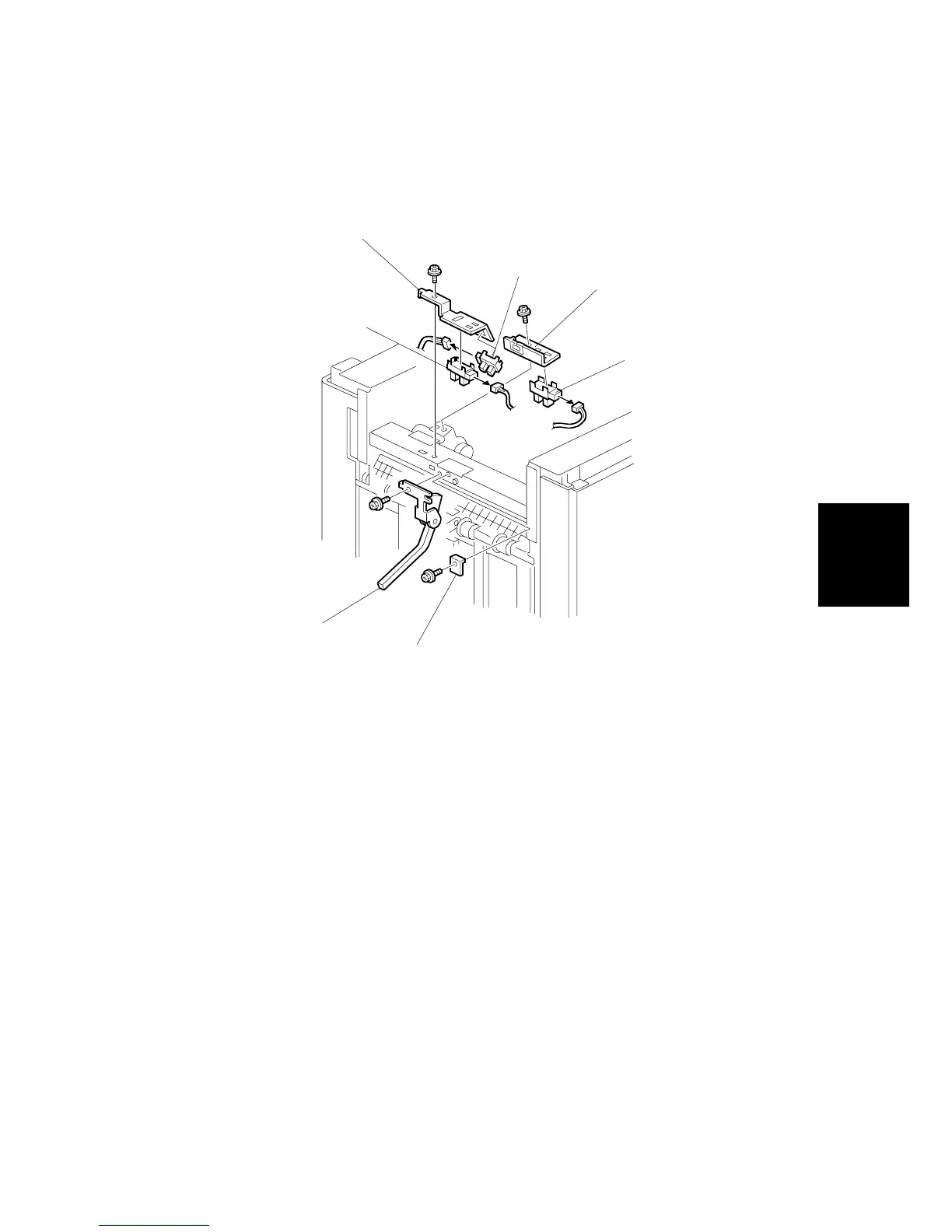
3.5.1 STACK HEIGHT 1, 2 AND EXIT GUIDE OPEN SENSOR
Stack Height Sensors 1 and 2
1. Remove the top cover. ( 3.1)
2. Remove the left upper panel and left upper cover ( x 2, x 2).
3. Remove the protector plate [A] ( x 1).
4. Remove the sensor feeler [B] ( x 1).
5. Remove the sensor bracket [C] ( x 1).
6. Replace the stack height sensor 1 [D] ( x 1) or 2 [E] ( x 1).
Exit Guide Open Sensor
1. Remove the sensor bracket [F] ( x 1).
2. Replace the exit guide open sensor [G] ( x 1).
B478R509.WMF
[G]
[F]
[C]
[E]
[D]
[B]
[A]



 To Next Page
 Loading...







