User Authentication
3-47
3
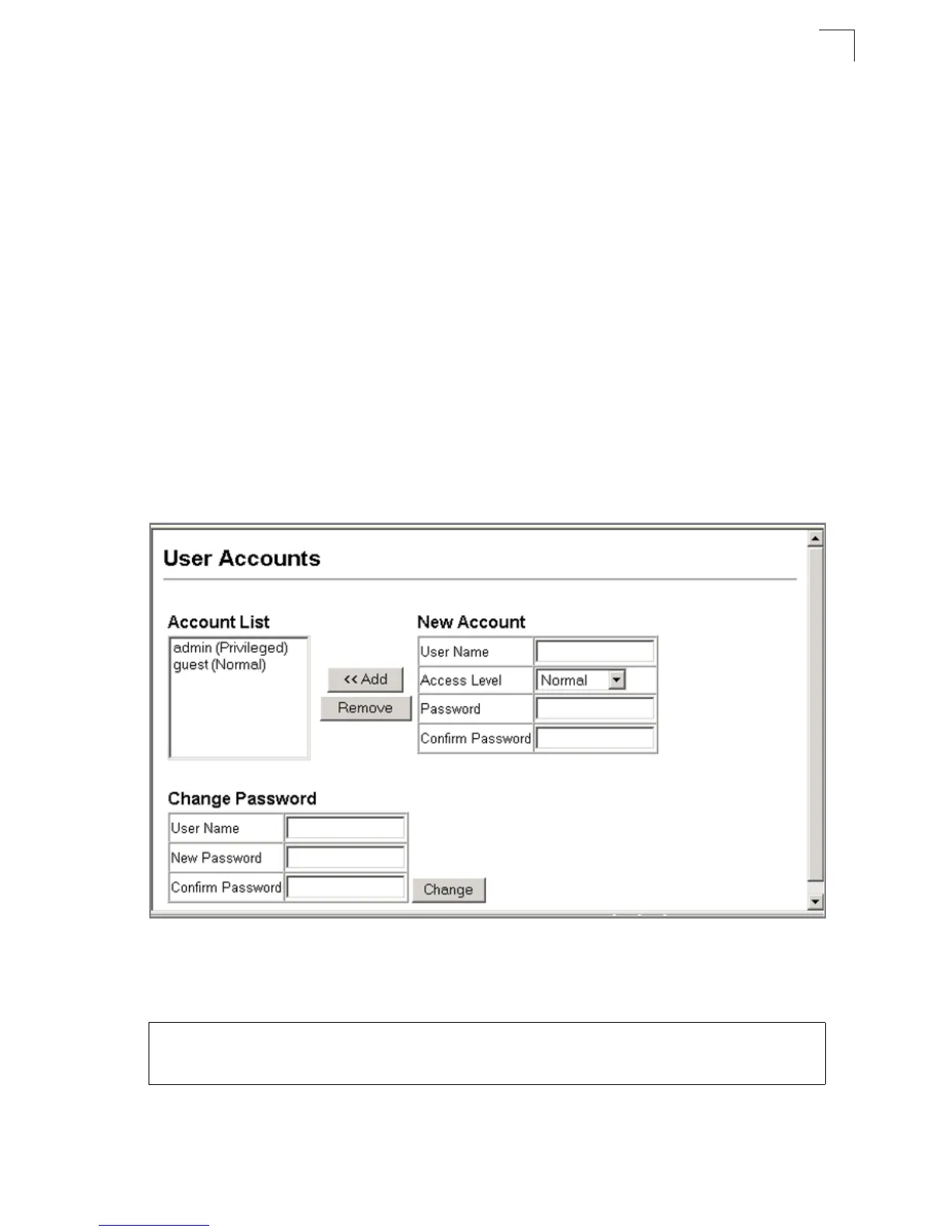
Command Attributes
• Account List – Displays the current list of user accounts and associated access
levels. (Defaults: admin, and guest)
• New Account – Allows configuration of a new account with Normal or Privileged
access.
• Add/Remove – Adds or removes an account from the list.
• User Name – The name of the user. (Maximum length: 8 characters)
• Access Level – Specifies the user level. (Options: Normal and Privileged)
• Password – Specifies the user password. (Range: 0-8 characters plain text,
case sensitive)
• Change Password– Sets a new password to overwrite an old password for the
specified user name.
Web – Click Security, User Accounts. To configure a new user account, specify a
user name, select the user’s access level, then enter a password and confirm it.
Click Add to save the new user account and add it to the Account List. To change the
password for a specific user, enter the user name and new password, confirm the
password by entering it again, then click Apply.
Figure 3-29. Configuring User Accounts
CLI – Assign a user name to access-level 15 (i.e., administrator), then specify the
password.
Console(config)#username bob access-level 15 4-26
Console(config)#username bob password 0 smith
Console(config)#


 To Next Page
 Loading...