External control unit 103
Connecting the external control unit to the drive module
External control unit connection cables
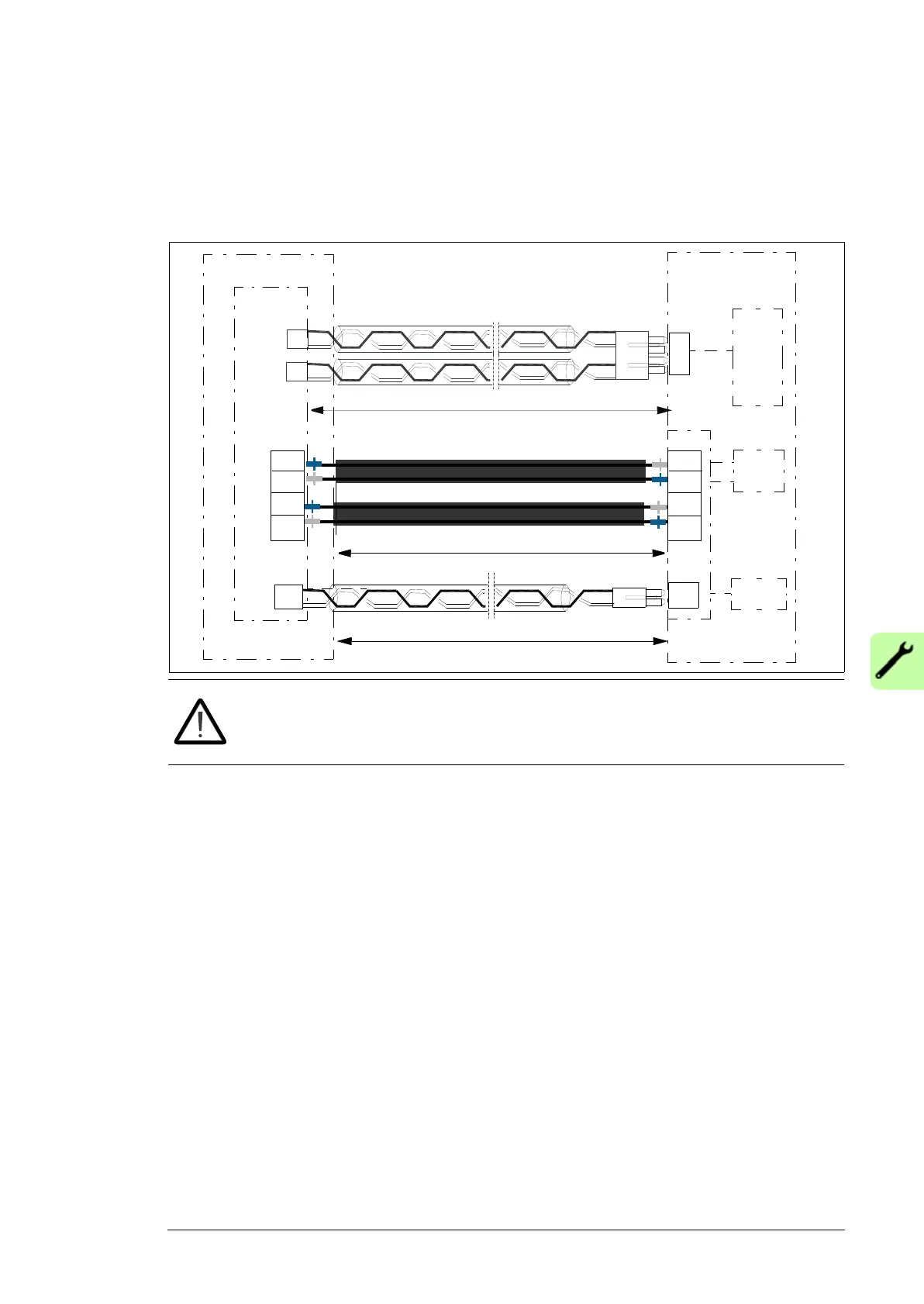
The cables that are delivered with the drive module for connecting the drive module and
control panel to the external control unit are shown below. .
WARNING! Handle the fiber optic cables with care. When unplugging optic
cables, always grab the connector, not the cable itself. Do not touch the ends of
the fibers with bare hands as the fiber is extremely sensitive to dirt.
Routing the control unit cables into the drive module
Route the control unit connection cables to the drive module through the slot in the middle
front cover at the front or left side. First, remove the plate which covers the slot. Then,
install the rubber grommet from the accessories box (item 2 in the drawing on page 84).
BPOW
1100 mm m (43.31 in)
1250 mm m (49.21 in)
ZBIB
ZCU
Drive module
BGDR
STO1
STO2
INU STO
X3
QOIA
BINT
V2
V7
1100 mm m (43.31 in)
V8
V13
V2
V1
V21
V20
24VDC
X2
X7
X8


 To Next Page
 Loading...