Garmin G3X Touch
™
Pilot’s Guide for Certified Aircraft
190-02472-00 Rev. D 185
Flight Planning
System
Overview
Flight
Instruments EIS
CNS
Interface
GPS
Navigation
Flight
Planning
Hazard
Avoidance
Additional
Features AFCS Annun/Alerts Appendix Index
Or
:
Touch Activate Approach.
Removing an approach from the Active Flight Plan:
1)
Press the MENU Key.
2)
Touch Remove Approach.
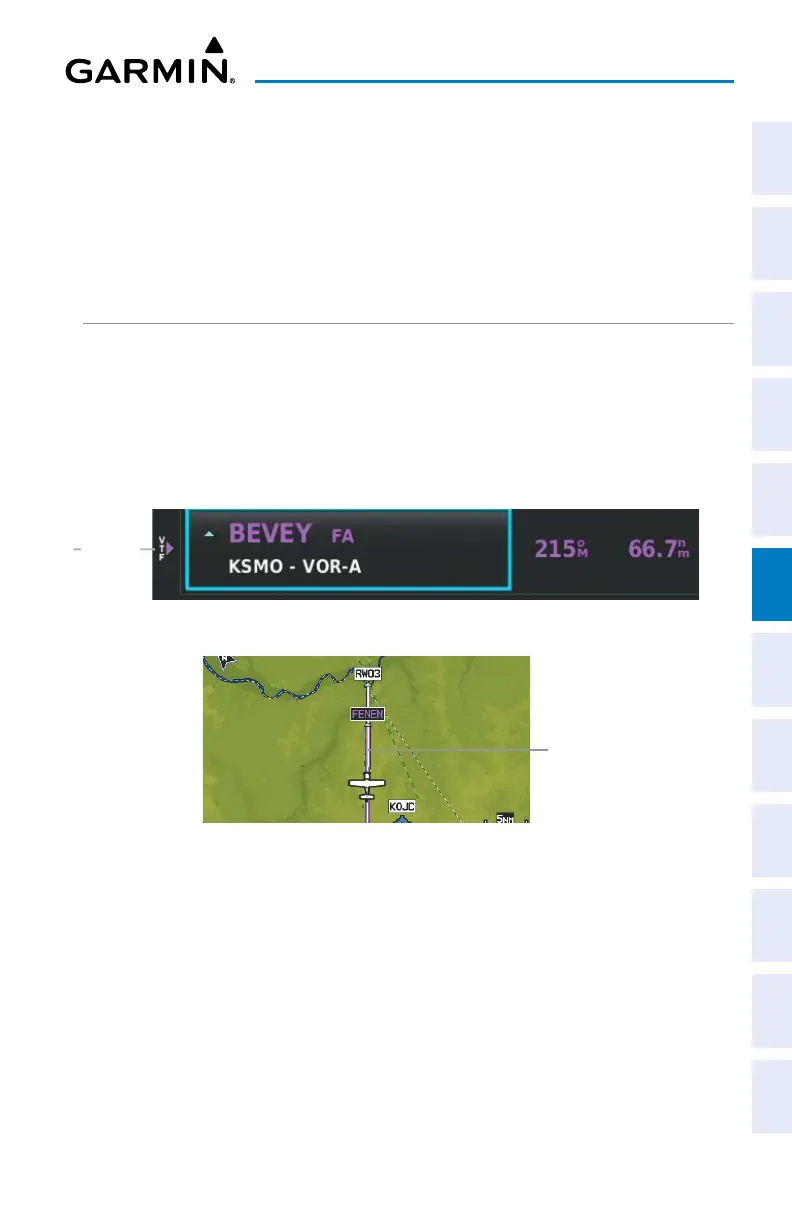
ACTIVATING VECTORS-TO-FINAL
Activate Vectors-to-Final is used when being vectored to the final approach course
by Air Traffic Control (ATC).
The G3X Touch creates an extension of the final course, beyond the final approach
waypoint in the database (final approach fix [FAF]). On the Active Flight Plan Page, a
Vector to Final symbol appears beside the first approach waypoint.
Vectors-to-Final
Vectors-
to-Final
Symbol
Vectors-to-Final
Final Course
Extension
The G3X Touch does not provide guidance to the inbound course. The course
deviation needle on the graphic HSI remains off-center until established on the final
approach course. The map shows an extension of the final approach course using a
bold magenta line.


 To Next Page
 Loading...













