25-11
Catalyst 6500 Series Switch Software Configuration Guide—Release 8.7
OL-8978-04
Chapter 25 Modifying the Switch Boot Configuration
Setting the CONFIG_FILE Environment Variable
This example shows how to set the BOOT environment variable:
Console> (enable) set boot system flash bootflash:cat6000-sup.5-5-1.bin
BOOT variable = bootflash:cat6000-sup.5-5-1.bin,1;
Console> (enable) set boot system flash bootflash:cat6000-sup.4-5-2.bin
BOOT variable = bootflash:cat6000-sup.5-1-1.bin,1;bootflash:cat6000-sup.4-5-2.
bin,1;
Console> (enable) set boot system flash bootflash:cat6000-sup.5-2-1.bin prepend
BOOT variable = bootflash:cat6000-sup.5-2-1.bin,1;bootflash:cat6000-sup.5-5-1.
bin,1;bootflash:cat6000-sup.4-5-2.bin,1;
Console> (enable)
Clearing the BOOT Environment Variable Settings
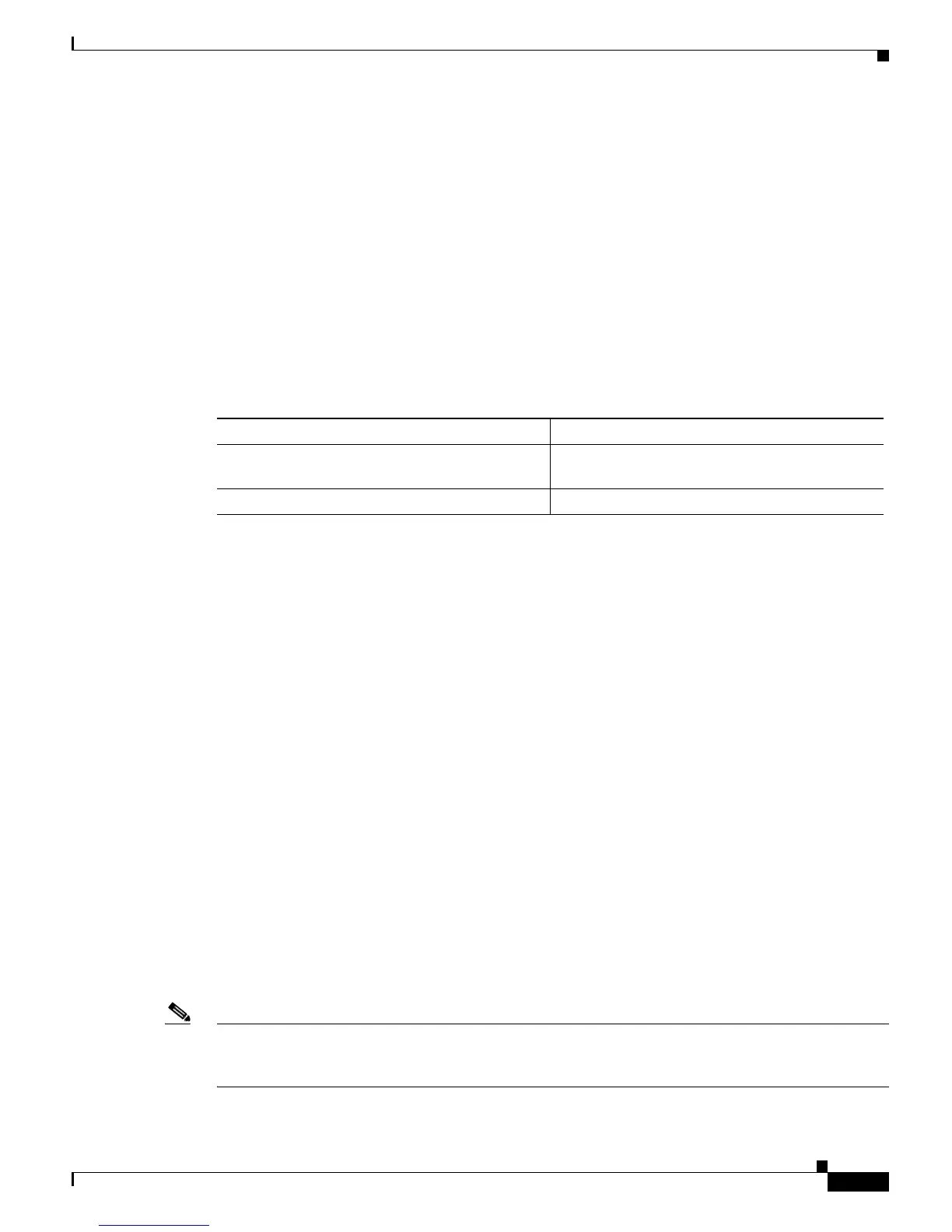
To clear the entries from the BOOT environment variable, perform one of these tasks in privileged mode:
This example shows how to clear a specific entry from the BOOT environment variable:
Console> (enable) clear boot system flash bootflash:cat6000-sup.5-1-1.bin
BOOT variable = bootflash:cat6000-sup.5-2-1.bin,1;bootflash:cat6000-sup.4-5-2.
bin,1;
Console> (enable)
This example shows how to clear the entire BOOT environment variable:
Console> (enable) clear boot system all
BOOT variable =
Console> (enable)
Setting the CONFIG_FILE Environment Variable
These sections describe how to modify the CONFIG_FILE environment variable:
• Setting the CONFIG_FILE Environment Variable, page 25-11
• Clearing the CONFIG_FILE Environment Variable Settings, page 25-12
Setting the CONFIG_FILE Environment Variable
You can specify multiple configuration files with the set boot auto-config command by separating them
with a semicolon (;). You must specify both the device name and the filename for each configuration file.
Note You cannot prepend or append the configuration files to the CONFIG_FILE environment variable.
Entering the set boot auto-config command erases any list of configuration files that were previously
specified using the set boot auto-config command.
Task Command
Clear a specific image from the BOOT
environment variable.
clear boot system flash device:[filename] [mod]
Clear the entire BOOT environment variable. clear boot system all [mod]



 To Next Page
 Loading...








