Route planning •
••
• 229
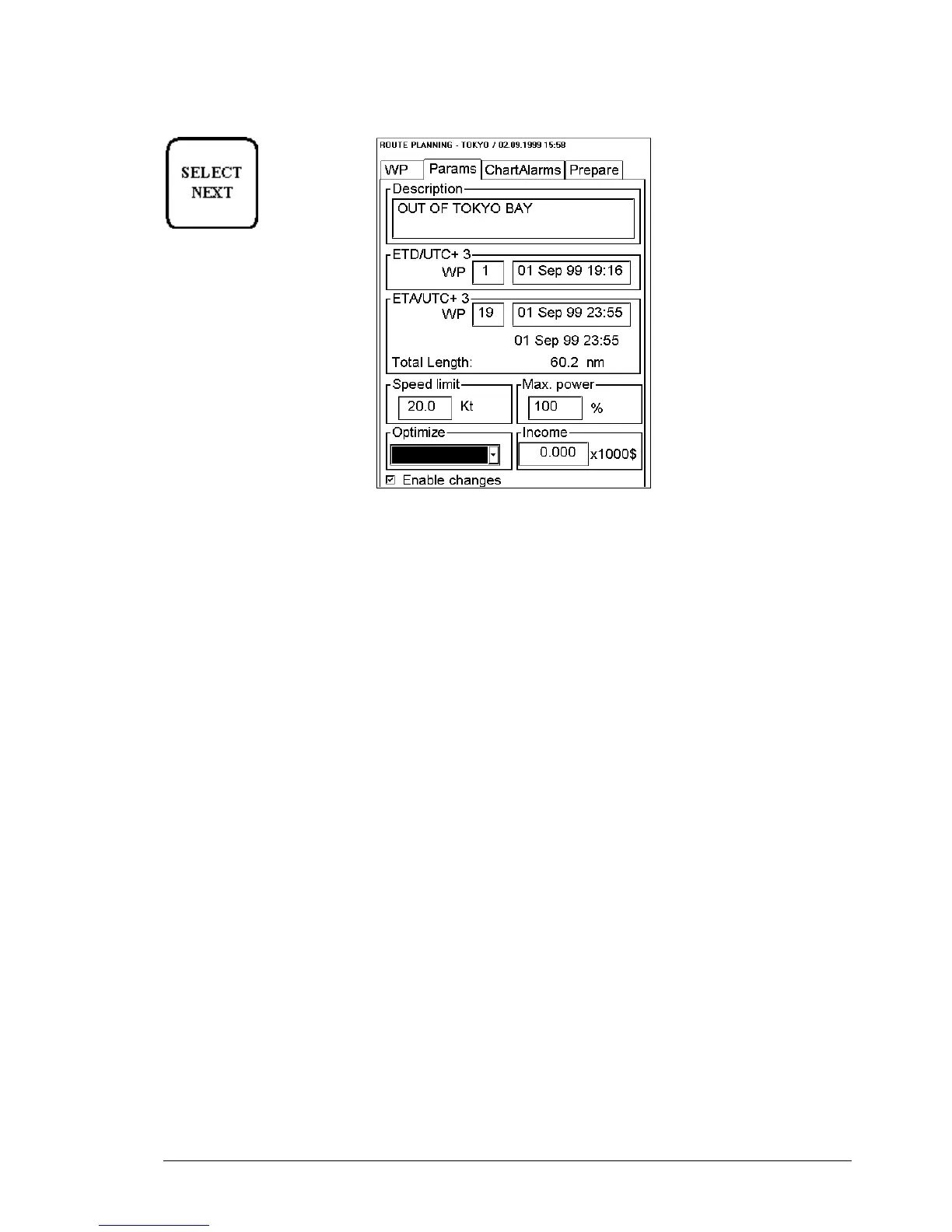
Fill in the Parameter sheet
Press SELECT NEXT button
to open parameters sheet.
Enable changes:
You have to select this in order to enable editing.
Description:
You can enter a note for the route.
ETD wp:
Planned estimated time of departure from a defined waypoint. (0 is automatic first waypoint)
ETA wp:
First part is planned estimated time of arrival to last waypoint. (0 is automatic last waypoint). ETA can be
calculated between two defined waypoints.
Second part is calculated ETA which may differ from planned ETA, if it is impossible to meet using selected
optimisation. Also total length of the route is displayed.
Speed limit:
You can set speed limit for a route.
Max. power:
You can set maximum power of engines which is used for VOS optimization. VOS is an optional software used in
optimization of route.
Income:
This indicates the budget given for this voyage. ( Income * 1000$)
Optimize type:
Optimize types are Max speed, Timetable, Max Profit and Min cost.
Optimize your route
After all waypoints are inserted and you have made safe water calculation, you can optimize your route. If not
selected then optimisation will be done automatically with Max. Speed. If you want do optimization with specific
strategy for more information, see "Available Optimization strategies" on page 236.


 To Next Page
 Loading...









