73
2.5 Subscan Unit
REGIUS MODEL 190 Service Manual Ver.1.00 2004.11.01
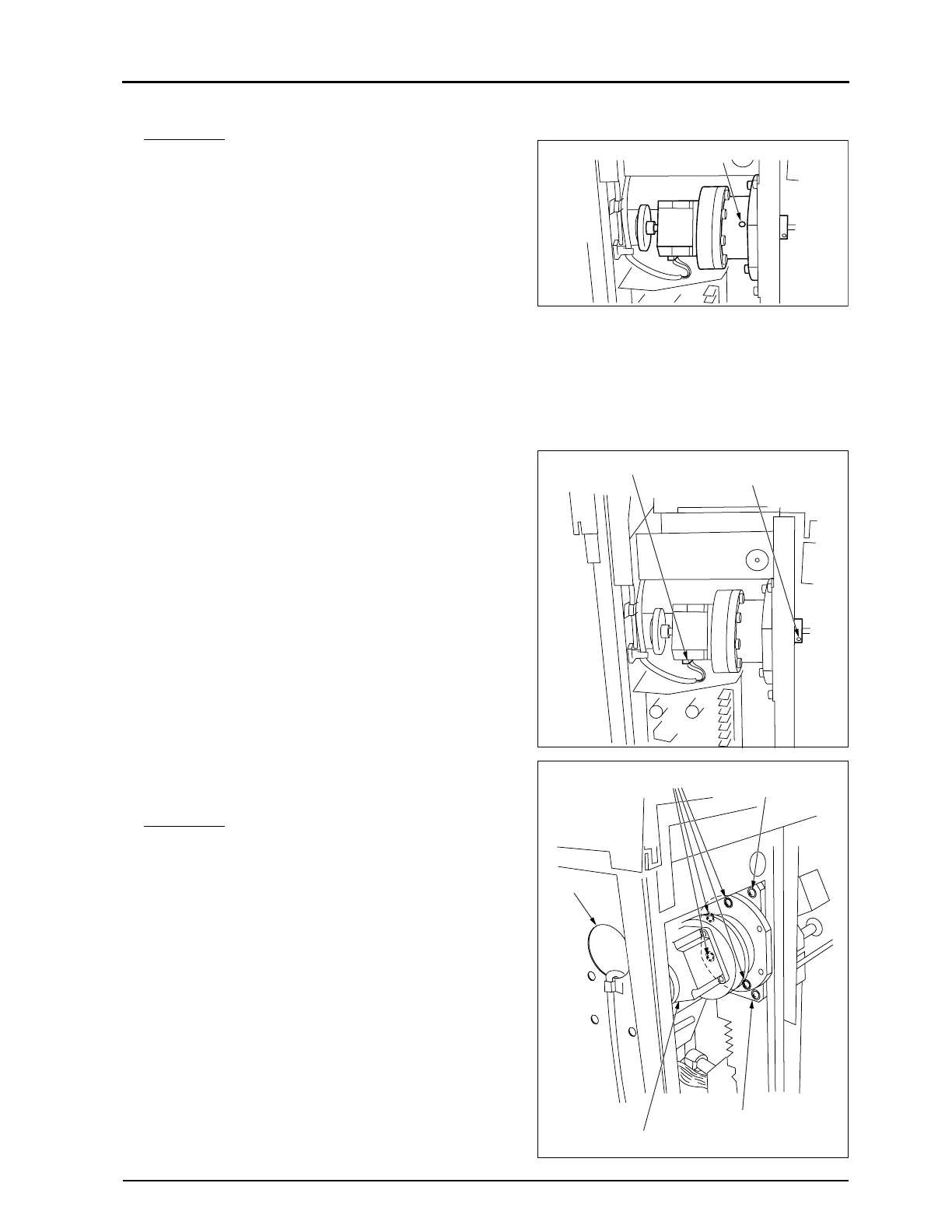
2.5.6 Replacement of Subscanning Motor (PM4)
Important If the subscanning motor is oriented with
its small hole facing downward, there is a
possibility that lubrication oil will leak
from its interior. When work is being car-
ried out on this motor, either ensure that
the hole remains facing up, or close it
over with tape or the equivalent.
• Removal
1.
Remove the rear cover. ("2.2.1 Removal of the Rear Cover,
p.28")
2.
Remove the right cover. ("2.2.2 Removal of the Left & Right
Covers, p.29")
3.
Unplug the connector from the subscanning motor.
• JP35
4.
Loosen the set screw on the coupling.
• Loosening the set screw releases the link between the
subscan motor shaft and the shaft on the steel belt.
5.
Remove four fixing screws, and remove the subscanning
motor (PM4).
Impor
tant Remove the four fixing screws which
directly secure the subscanning motor,
not the four screws which are securing
the motor base nearby must not be loos-
ened.
• There is an opening on the right side of the main unit so
that a long screw driver can be used through this hole.
Small Hole
Connector
Set Screw on Coupling
Fixing Screw
Touch-Banned Screw
Touch-Banned Screw
Subscan Motor (PM4)
Opening


 To Next Page
 Loading...






