122
3.7 Adjusting the Pressing Amount
REGIUS MODEL 190 Service Manual Ver.1.00 2004.11.01
3.7 Adjusting the Pressing Amount
When any of the cassette magnetizing plate, transport evacua-
tion sensor (S11), transport rack gear, etc. which affects the
magnetizing position, follow the procedures below to adjust the
pressing amount which the transport unit applies to the cas-
sette magnetizing plate.
1.
Remove the rear cover.
2.
Remove the right and left cover.
3.
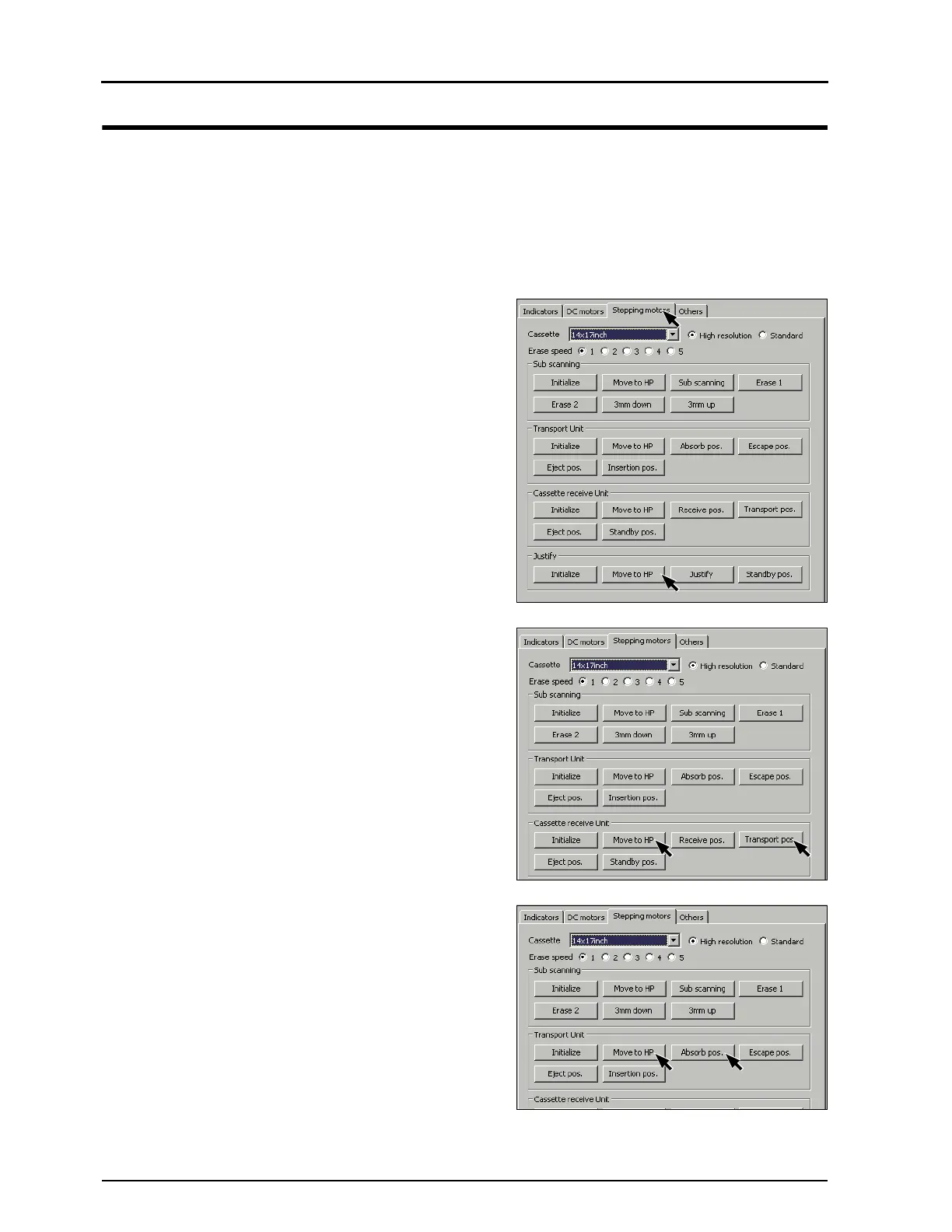
Start the dummy SBC2 program, and open the mainte-
nance window. ("3.2 Set Up of dummy SBC2 program,
p.99")
4.
Click [Stepping motors] tab.
5.
Click [Move to HP] of "Justification".
•"Justification to HP .... OK" on the "Information" window.
6.
Click [Move to HP] of "Cassette receive Unit".
• "Cassette receive Unit to HP .... OK" on the "Information"
window.
7.
Click [Transport Position] of "Cassette receive Unit".
• "Cassette receive Unit Transport Position .... OK" on the
"Information" window.
8.
Click [Move to HP] of
Transport Unit".
• "Move to Transport Unit to HP .... OK" on the "Informa-
tion" window.
9.
Click [Absorb pos.] of "Transport Unit".
•"Transport Magnetizing Position .... OK" on the "Informa-
tion" window.


 To Next Page
 Loading...






