Displays
Vehicle equipment
This chapter describes equipment, systems and
functions which are offered or will be offered on
a model-specific basis, even if they are not inclu‐
ded in the vehicle in question.
For further information:
Vehicle equipment, see page 7.
Instrument cluster
Principle
The instrument cluster is a variable display.
When you change to a different programme via
the My Modes button, the displays in the instru‐
ment cluster and the layout of the displays adapt
to the respective drive mode.
General
The displays in the instrument cluster can some‐
times differ from the illustrations in the Owner's
Handbook.
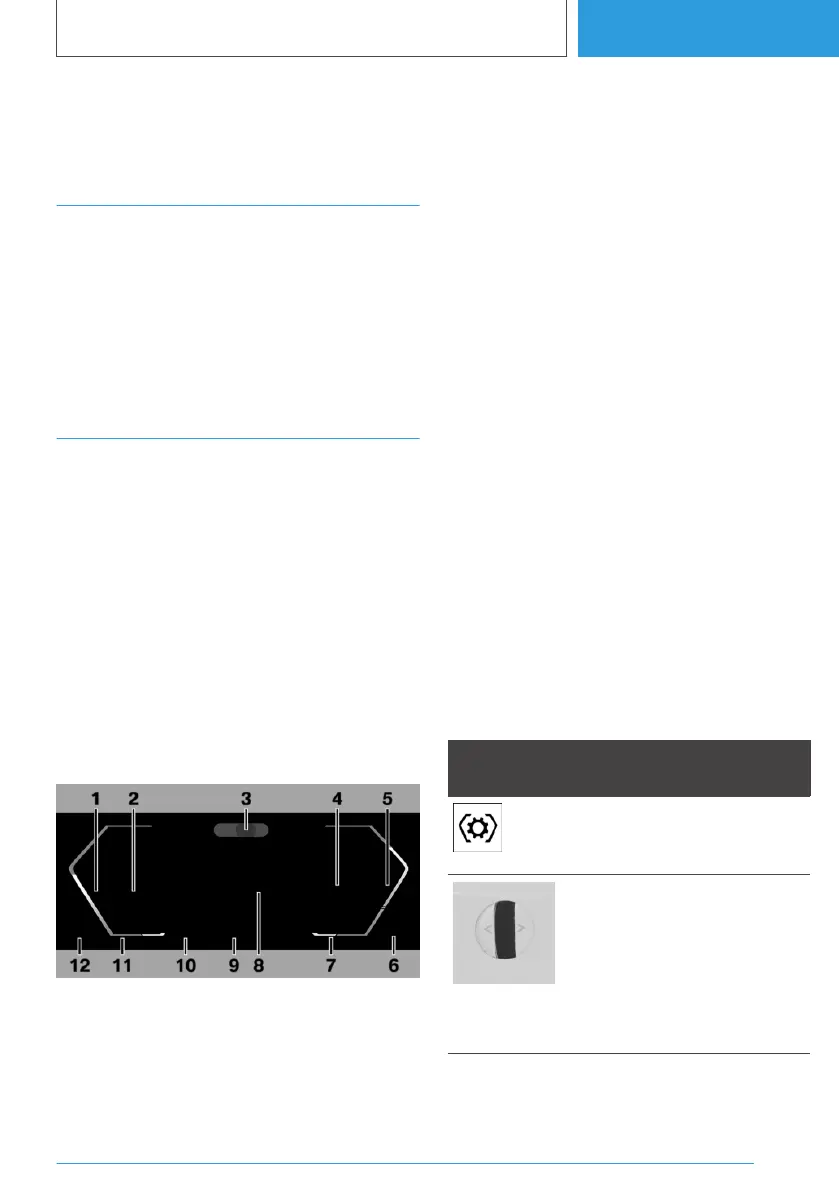
Overview
1 Speedometer
2 Driver assistance systems 227
Parking assistance systems 251
3 Driver Attention Camera 74
4 Efficiency Coach 320
Selection lists 169
Check Control 157
5 Power display 163
6 Range 164
7 Selector lever position 138
Outside temperature 164
8 Central display area, configurable 154
Navigation display
Charge display 156
Digital speed
Trip odometer, see Trip data 170
9 Status My Modes 144
10 Speed Limit Assist 244
Speed Limit Info 166
11 Time 73
12 Charging status display of the high-voltage
battery 163
Operating elements on the steering
wheel
Operating ele‐
ment
Function
Display selection menu in
the instrument cluster:
press button.
Selection up or down: turn
knurled wheel.
Selection to the left or right:
tilt knurled wheel in the cor‐
responding direction.
Confirm selection: press
knurled wheel.
Seite 153
Displays
CONTROLS
153
Online Edition for Part no. 01405A38CB9 - VI/21


 To Next Page
 Loading...