6-1
6. CHART OVERVIEW
6.1 Chart Screen Overview
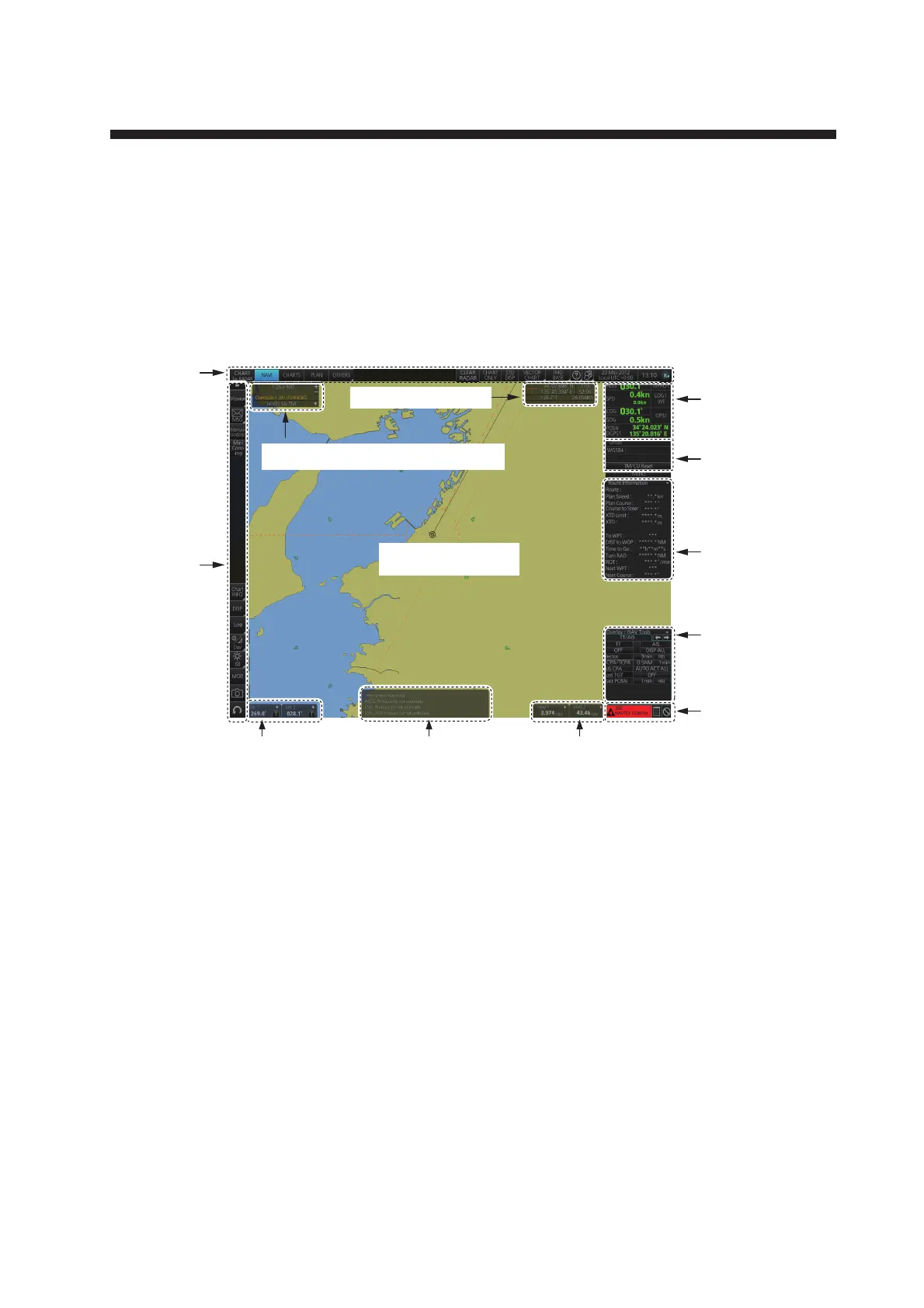
The chart screen is divided into several areas, as illustrated below (The layout on your
screen may differ slightly depending on your monitor’s resolution).The chart screen
operational area has no limitations. That is, high latitudes (85° and higher) are correct-
ly displayed always*. The chart screen uses “cylindrical equidistant” projection for ar-
eas of high latitude and small chart scales. All other conditions use the “orthographic”
presentation.
*: High altitudes are not supported in RADAR mode.
• The Status bar provides for selection of display mode, chart format, IMO chart display; one-click
restoration of IMO standard display, etc.
• The Sensor information box displays ship's speed, course and position and selects sensors.
• The Own ship functions box applies offset to the chart.
• The Route information box shows route and waypoint data, when a route is selected for naviga-
tion.
• The Overlay/NAV Tools box provides for setup of navigation-related functions.
• The Alert box shows operational and system alert messages.
• The VRM boxes measure the range to an object.
• The Permanent warning box displays chart-related warning messages.
• The EBL boxes measure the bearing to an object.
• The InstantAccess bar™ provides quick access to functions such as brilliance adjustment, dis-
play palette and the chart-related menu. The contents change according to the display mode se-
lected.
• The Chart scale/presentation mode box selects the chart scale and presentation mode.
• The Cursor position box shows the latitude and longitude position of the cursor and the TTG to
the cursor.
• The Electronic chart area shows the chart.
Note: If the display indications freeze, the buzzer sounds continuously. Restart the unit to restore
normal operation.
Status
bar
Sensor
information
box
Alert box
Instant
Access
bar
Own ship
functions
box
Route
information
box
Overlay/NAV
Tools box
Electronic chart area
Chart scale/presentation mode box
Cursor position box
EBL1 box, EBL2 box VRM1 box, VRM2 boxPermanent warning box


 To Next Page
 Loading...








