18. TT AND AIS DISPLAYS
18-5
18.2.3 How to filter AIS targets
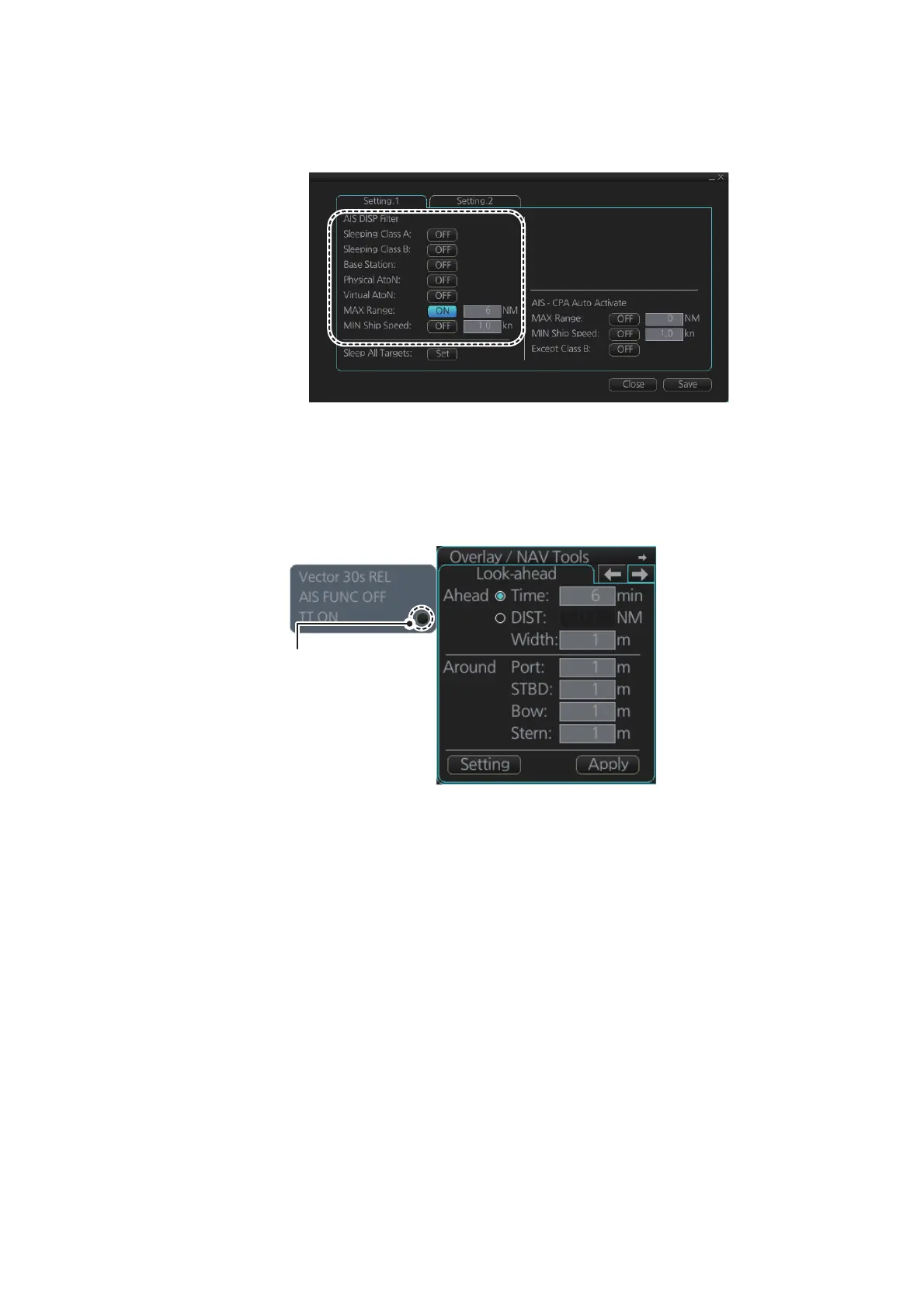
1. Right-click [AIS] on the [TT/AIS] page in the [NAV Tools/Overlay box], select [Set-
ting] and open the [Setting.1] page.
Note: You can also access the [Setting.1] page with one of the following methods:
• From the main menu, select [TT/AIS], [Settings] and [Setting.1].
• Click the TT/AIS settings radio button (indicated in the figure below) from the
Overlay/NAV Tools box. (The radio button is not available when the TT/AIS
page is displayed.)
2. In the [AIS DISP Filter] window, set each item referring to the description below.
• Click the buttons of [Sleeping Class A] and [Sleeping Class B] to show [OFF] or
[ON] to hide or show those targets.
• Click the button of [Base Station] to show [OFF] or [ON] to hide or show AIS
base stations.
• Click the button of [Physical AtoN] to show [OFF] or [ON] to hide or show Phys-
ical AtoN targets.
• Click the button of [Virtual AtoN] to show [OFF] or [ON] to hide or show Virtual
AtoN targets.
• Set the maximum range with [MAX Range]. Any target beyond the range set
here will not be displayed.
• Set the ship speed for AIS targets, with [MIN Ship Speed]. Any AIS target
whose speed is lower than that set here will not be displayed.
3. Click the [Save] button to save settings. Click the [Close] button to close the dialog
box.
Note: AIS and tracked target viewing limitations are as follows:
AIS and tracked targets are displayed on top of chart 1:1,000,001 for S57 charts.
Click this button.


 To Next Page
 Loading...








