2. RADAR, CHART RADAR OPERATION
2-26
2.21 Target Trails
The trails of the radar echoes of targets may be displayed in the form of synthetic af-
terglow. Target trails are selected either relative or true and may be sea or ground sta-
bilized. True motion trails require a compass signal, and position and speed inputs.
2.21.1 Target trails-related indications
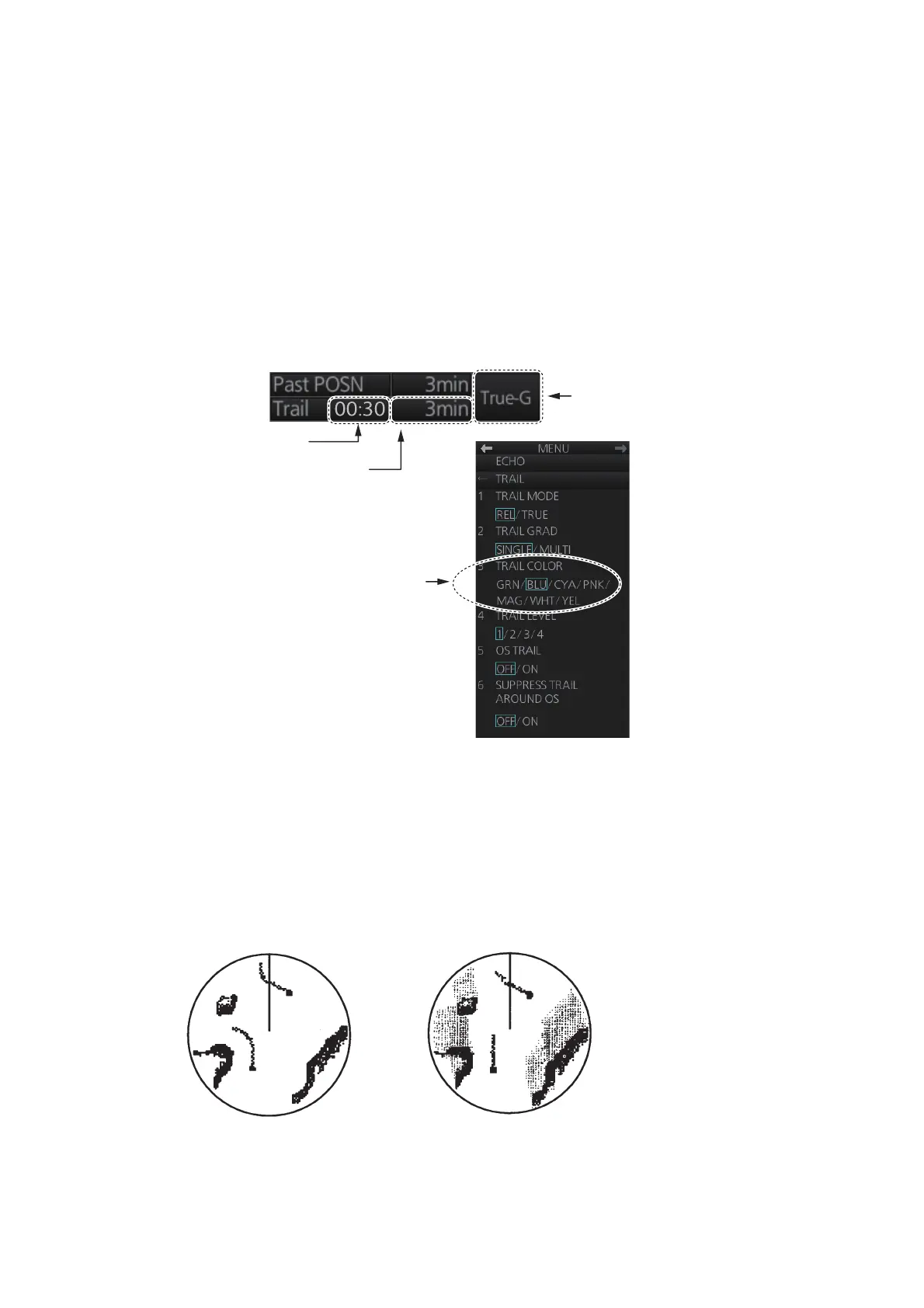
Trail-related indications are located at the bottom-right position on the screen. Several
trail-related operations can be done from the [TRAIL] menu, which you can show by
right-clicking the Trail time indication. You can also left-click the trail time indication to
change the trail time.
2.21.2 True or relative target trails
You may display echo trails in true or relative motion. Relative trails show relative
movements between targets and own ship. True motion trails present true target
movements in accordance with their over-the-ground speeds and courses. The trail
and past position modes in the North-up true motion are fixed to True.
Click the Trail mode indication to select [True-G], [True-S] or [REL] as appropriate.
Trail mode
Trail time
Click to change the
setting or right-click to
show the
[
TRAIL
]
menu.
TRAIL COLOR not available
with IMO or A type.
Elapsed trail time
True target trails
(No smearing of
stationary targets)
Relative target trails
(Targets moving
relative to own ship)



 To Next Page
 Loading...







