Zynq-7000 AP SoC and 7 Series FPGAs MIS v4.1 84
UG586 November 30, 2016
www.xilinx.com
Chapter 1: DDR3 and DDR2 SDRAM Memory Interface Solution
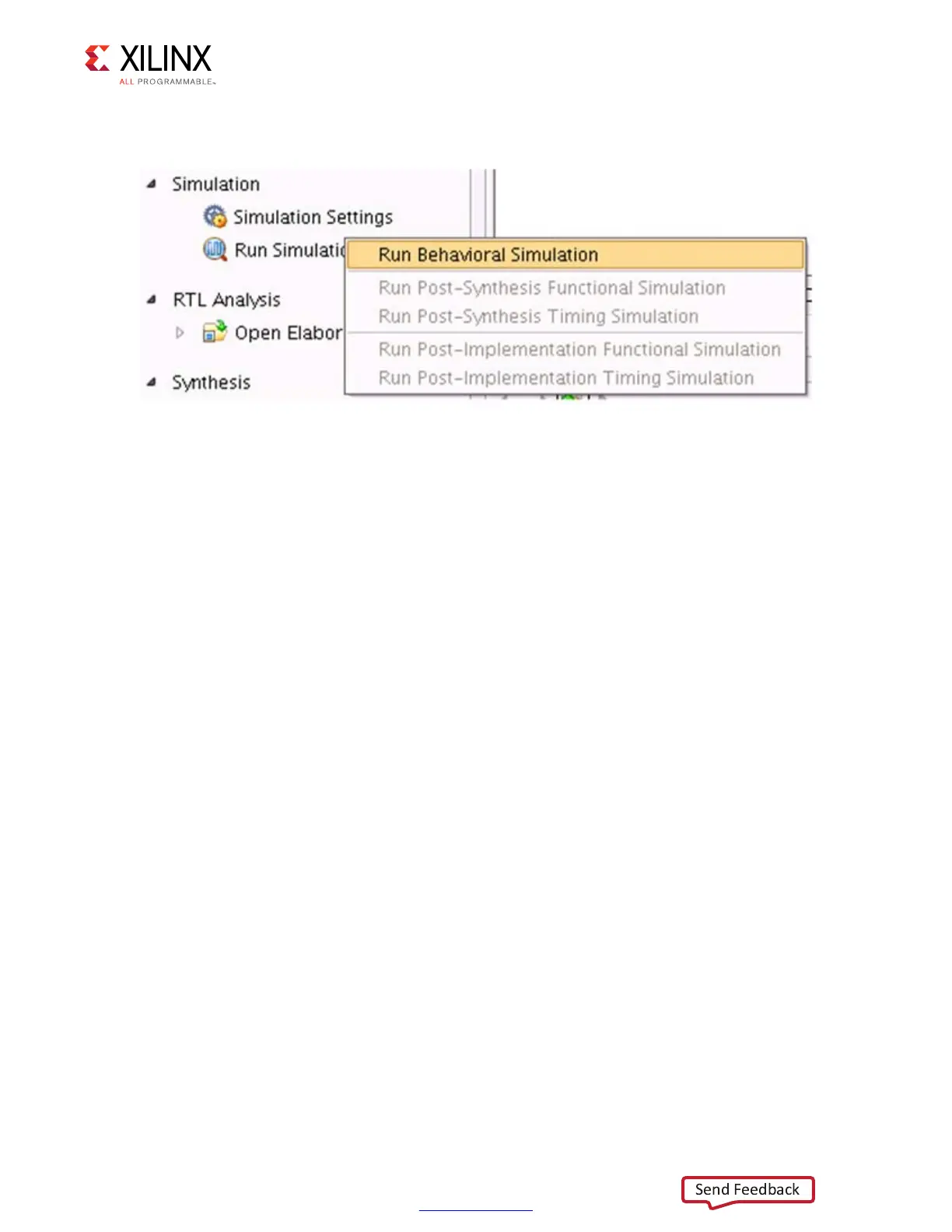
3. In the Flow Navigator window, select Run Simulation and select Run Behavioral
Simulation as shown in Figure 1-47.
Simulation Flow Using Questa Advanced Simulator
1. In the Open IP Example Design Vivado project, under Flow Navigator select
Simulation Settings.
2. Select Target simulator as Questa Advanced Simulator/ModelSim.
a. Browse to the Compiled libraries location and set the path on Compiled libraries
location option.
b. Under the Simulation tab, set the modelsim.simulate.runtime to 1 ms (there
are simulation RTL directives which stop the simulation after certain period of time,
which is less than 1 ms), set modelsim.simulate.vsim.more_options to
-novopt as shown in Figure 1-46.
3. Apply the settings and select OK.
X-Ref Target - Figure 1-47
Figure 1-47: Run Behavioral Simulation



 To Next Page
 Loading...