GENERATOR AND STARTER CLUTCH
5-32
EAS24530
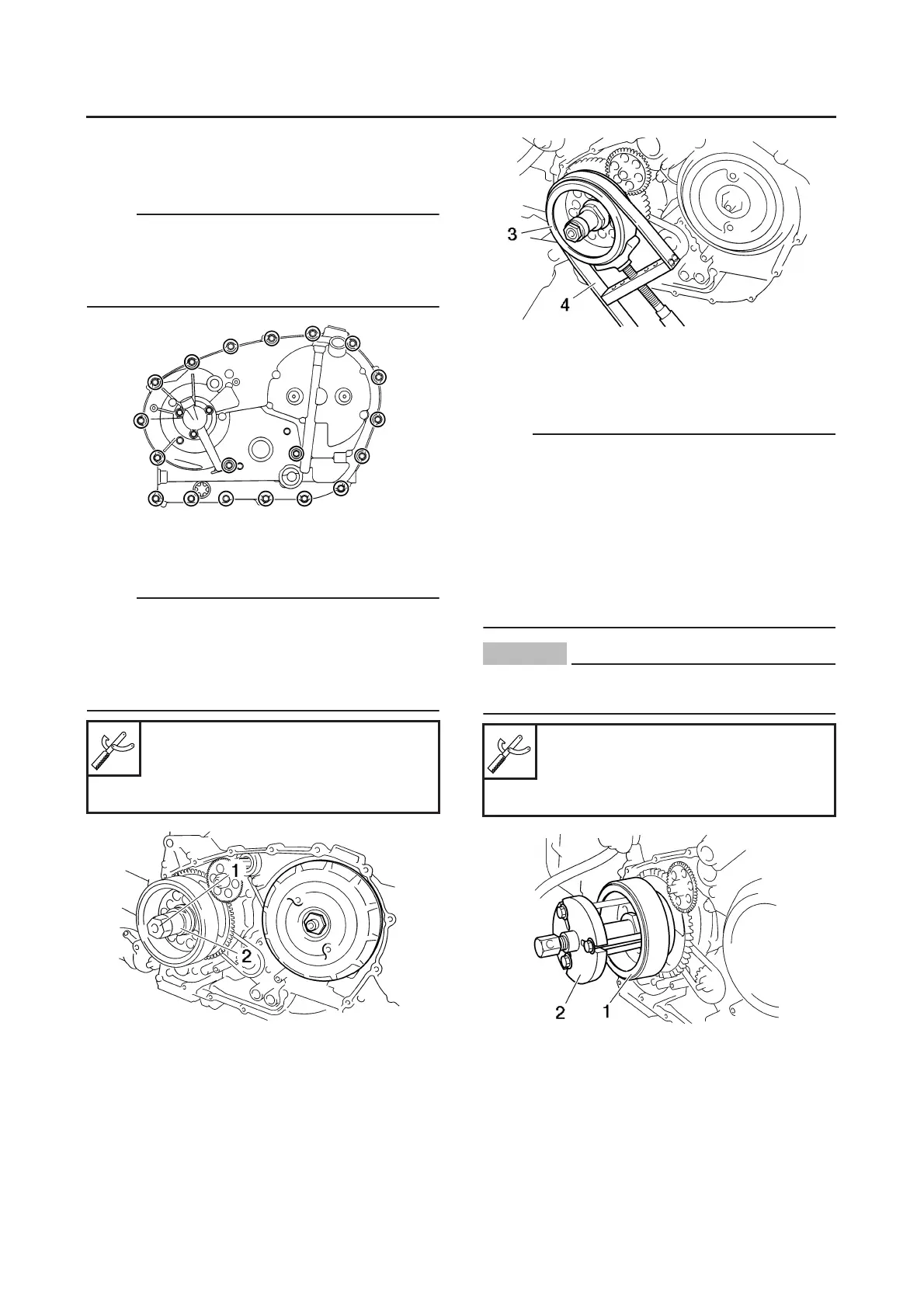
REMOVING THE A.C. MAGNETO ROTOR
1. Remove:
● A.C. magneto rotor cover
NOTE:
Loosen each bolt 1/4 of a turn at a time, in stag-
es and in a crisscross pattern.
After all of the bolts are fully loosened, remove
them.
2. Remove:
● A.C. magneto rotor nut “1”
● Spacer “2”
NOTE:
● While holding the A.C. magneto rotor “3” with
the rotor holding tool “4”, loosen the pickup coil
rotor bolt.
● Do not allow the sheave holder to touch the
projection on the A.C. magneto rotor.
3. Remove:
● A.C. magneto rotor “1”
(with the flywheel puller set “2”)
● Woodruff key
NOTE:
● Remove the A.C. magneto rotor “1” using the
flywheel puller.
● Center the flywheel puller over the A.C. mag-
neto rotor. Make sure after installing the hold-
ing bolts that the clearance between the
flywheel puller and the A.C. magneto rotor is
the same everywhere. If necessary, one hold-
ing bolt maybe turned out slightly to adjust the
flywheel puller’s position.
CAUTION:
ECA15B1038
Cover the crankshaft end with the box
wrench for protection.
EAS24570
CHECKING THE STARTER CLUTCH
1. Check:
● Starter clutch
Damage/wear → Replace.
2. Check:
● Starter clutch idle gear
● Starter clutch drive gear
Sheave holder
90890-01701
Primary clutch holder
YS-01880-A
Flywheel puller
90890-01362
Heavy duty puller
YU-33270-B


 To Next Page
 Loading...