Connection
H00007091 - Absolute Arm User Manual │Version 5.2.0 (2019-03-07) │96
E.3 USB CONNECTION (ARM + INTEGRATED SCANNER)
Wired connection: to get benefits from the high-speed scanning, an on-board Gigabit
network device is necessary.
E.3.1 ARM SETUP
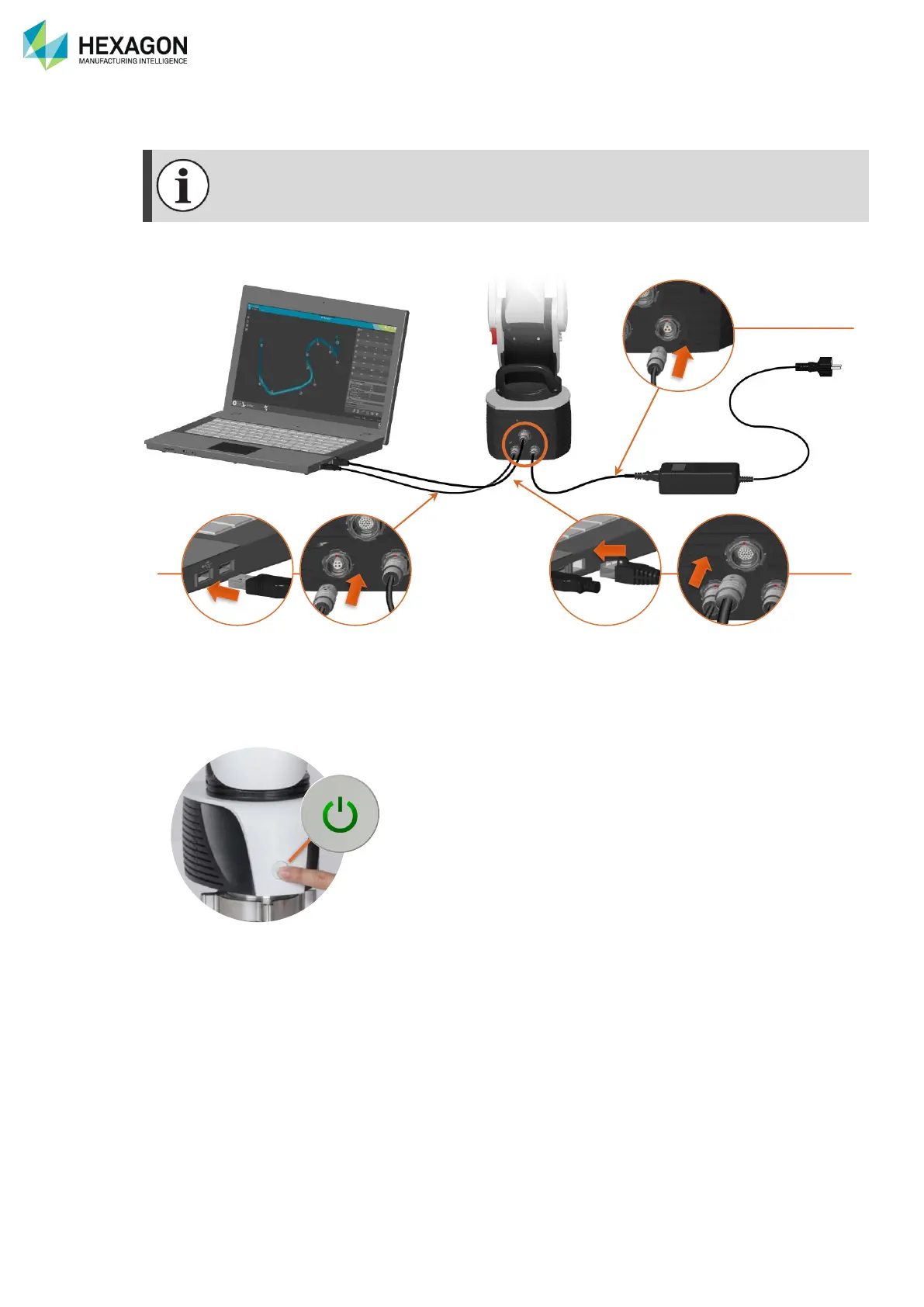
Fig. 34 : USB + Scanner connection
1. Ensure that at least a Scanning Pack (CP1 / CP2 or CP3) is mounted.
2. Connect the power supply to the arm. (Or use on battery for CP3)
3. Connect the USB cable from the arm to the computer
4. Connect the Ethernet cable from the arm to the computer
5. Power on the arm by holding the power button for at least 1 second.
E.3.2 RDS SETUP (DEFAULT)
1. Enter RDS Control Panel, Tab “Connection”
2. Select the type: “Absolute Arm” > Select the appropriate Control Pack > USB
3. Save and Exit


 To Next Page
 Loading...
