DRIVE PULLEY/DRIVEN PULLEY/CLUTCH
INSTALLATION
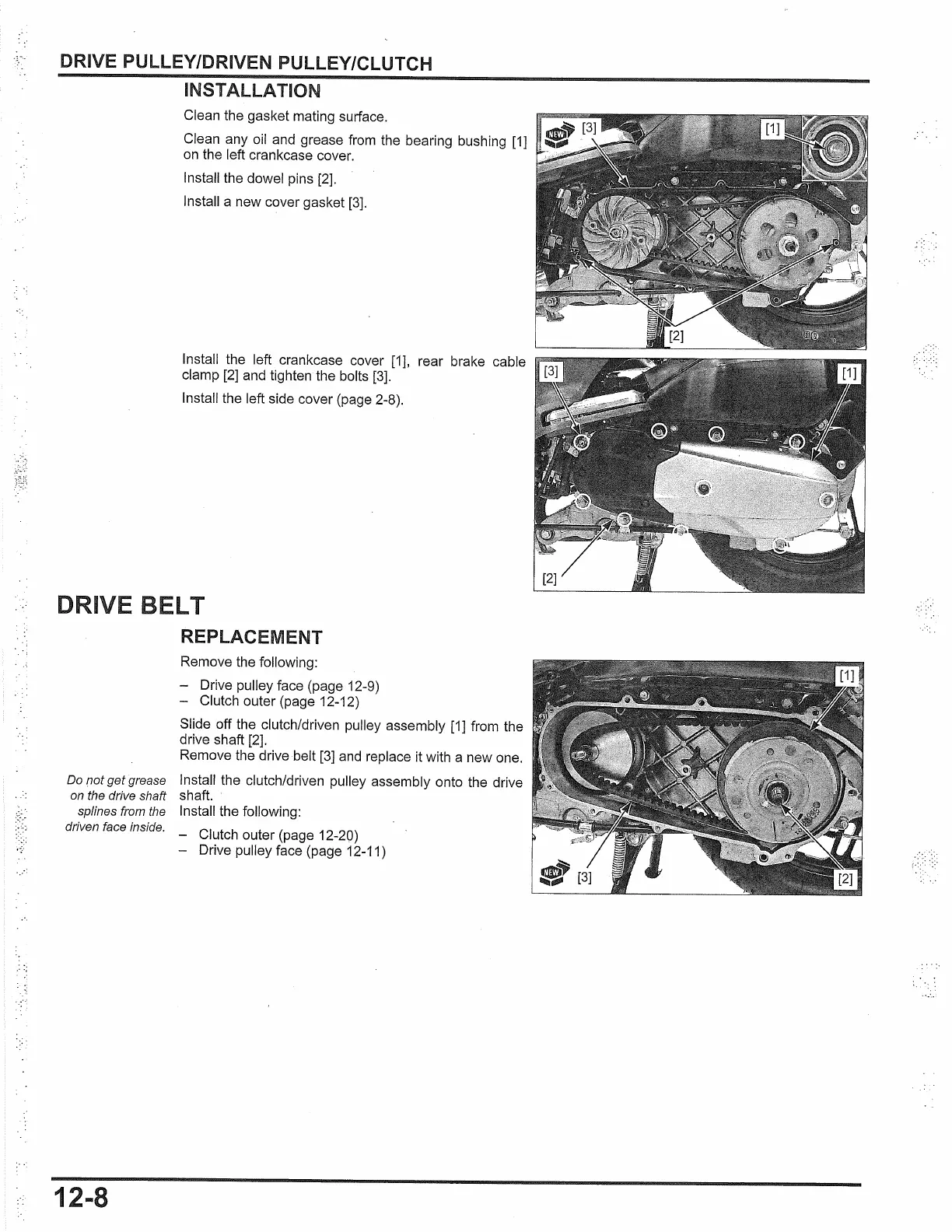
Clean the gasket mating surface.
Clean any oil and grease from the bearing bushing
[1]
on
the left crankcase cover.
Install the dowel pins [2].
Install a new cover gasket
[3].
Install the left crankcase cover
[1],
rear brake cable
clamp [2] and tighten the bolts
[3].
Install the left side cover (page 2-8).
DRIVE LT
Do
not
get
grease
on the drive shaft
splines from the
driven face inside.
12-8
REPLACEMENT
Remove the following:
- Drive pulley face (page 12-9)
- Clutch outer (page 12-12)
Slide off the clutch/driven pulley assembly
[1]
from the
drive shaft [2].
Remove the drive belt
[3]
and replace it with a new one.
Install the clutch/driven pulley assembly onto the drive
shaft.
Install the following:
Clutch outer (page 12-20)
- Drive pulley face (page 12-11)


 To Next Page
 Loading...