FRAM8BODYPANEL~EXHAUSTSYSTEM
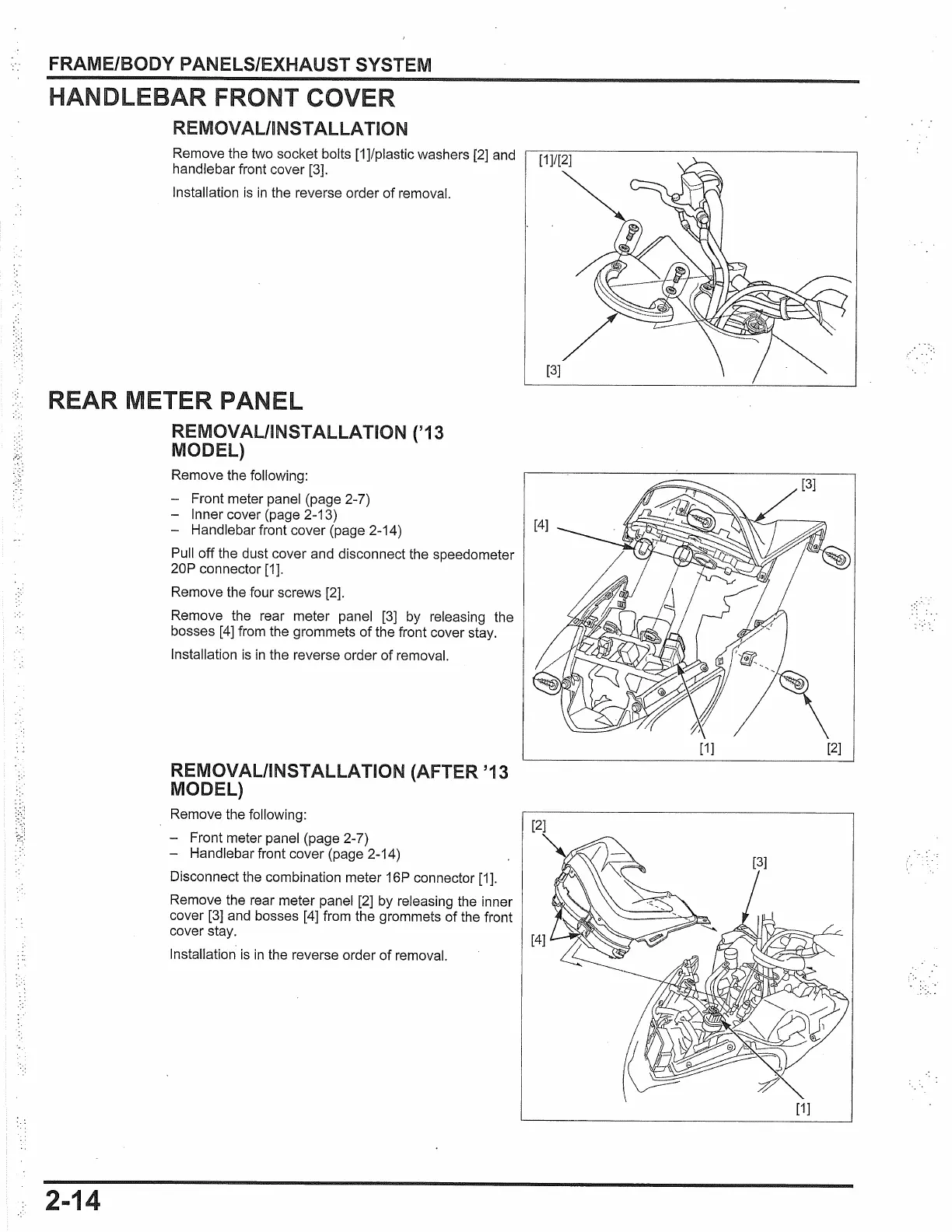
HANDLEBAR FRONT COVER
REMOVAL/INSTALLATION
Remove the two socket bolts
[1
]/plastic washers [2] and
handlebar front cover [3].
Installation
is
in
the reverse order
of
removal.
REAR METER PAN L
REMOVAL/INSTALLATION
('13
MODEL)
2-14
Remove the following:
- Front meter panel (page 2-7)
- Inner cover (page 2-13)
- Handlebar front cover (page 2-14)
Pull off the dust cover and disconnect the speedometer
20P connector
[1
].
Remove the four screws [2].
Remove the rear meter panel
[3]
by releasing the
bosses
[4]
from the grommets
of
the front cover stay.
Installation
is
in
the reverse order
of
removal.
REMOVAL/INSTALLATION (AFTER '13
MODEL)
Remove the following:
- Front meter panel (page 2-7)
- Handlebar front cover (page 2-14)
Disconnect the combination meter 16P connector [1].
Remove the rear meter panel [2] by releasing the inner
cover [3] and bosses [4] from the grommets of the front
cover stay.
Installation
is
in
the reverse order
of
removal.
.
•.
/
..
[1]
[2]
[1]



 To Next Page
 Loading...