CHAPTER 5 IMAGE FORMATION SYSTEM
COPYRIGHT
©
2002 CANON INC. 2000 CANON iR1600/iR2000 REV.1 JAN. 2002
5-17
7.1 Photosensitive Drum
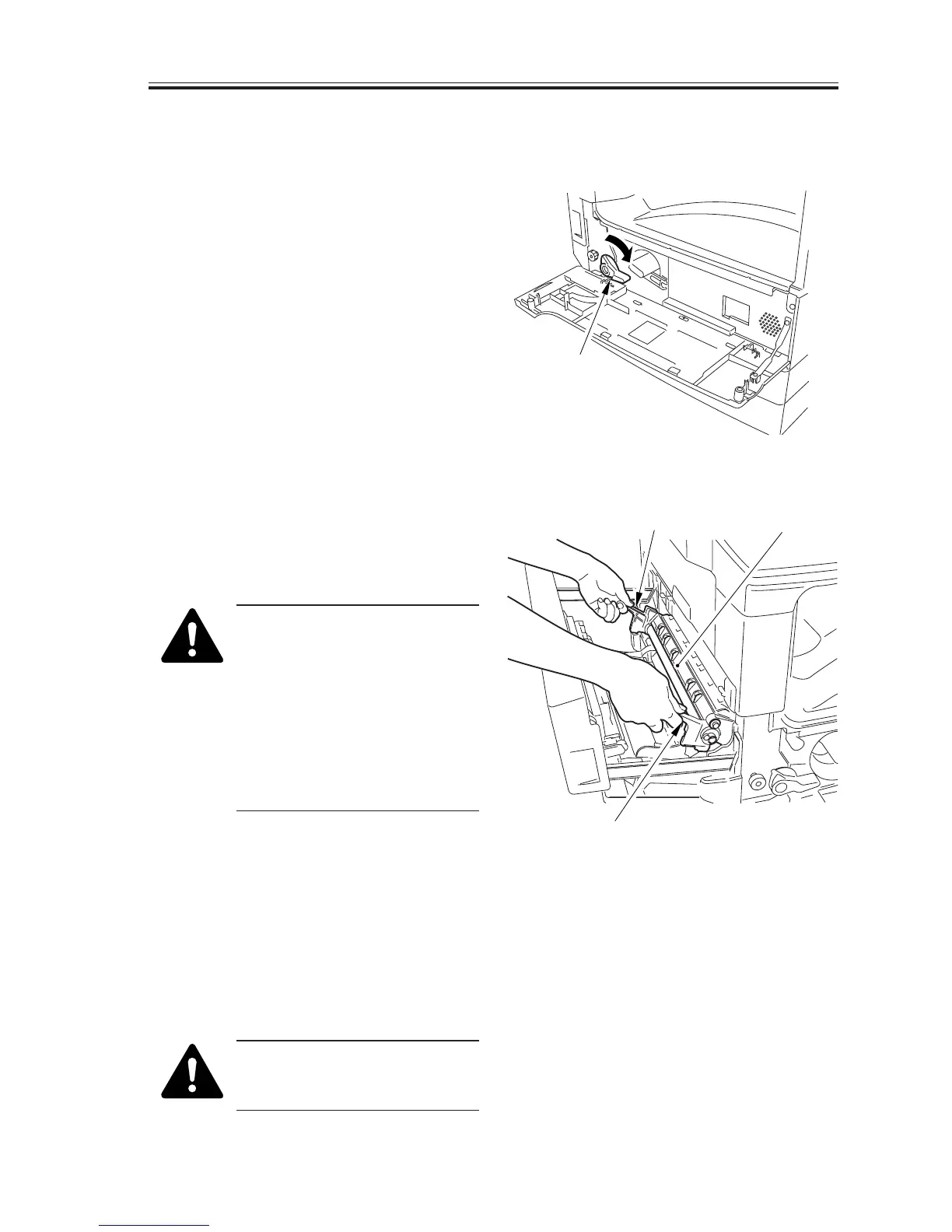
7.1.1 Removing the Drum Unit
1) Open the front cover.
2) Shift down the developing assembly
locking lever [1] to unlock the develop-
ing assembly.
F05-701-01
3) Slide out the left cover.
4) Holding the grips [2], pull out the drum
unit [3].
When removing the drum unit,
be sure to hold the grips and
take care not to scratch or soil
it.
Further, the photosensitive drum
is highly sensitive to light.
Whenever you have removed it,
be sure to protect it against
light.
F05-701-02
7.1.2 Cleaning the Photosensitive Drum
If the surface of the photosensitive drum
is soiled, wipe it with a flannel cloth coated
with toner. (Do not use paper, lint-free or
otherwise).
Do not dry wipe it or do not use
solvent. Moreover, do not use
drum cleaning powder.
[1]



 To Next Page
 Loading...





