CHAPTER 5 IMAGE FORMATION SYSTEM
COPYRIGHT
©
22002 CANON INC. 2000 CANON iR1600/iR2000 REV.1 JAN. 2002
5-18
7.2 Developing Assembly
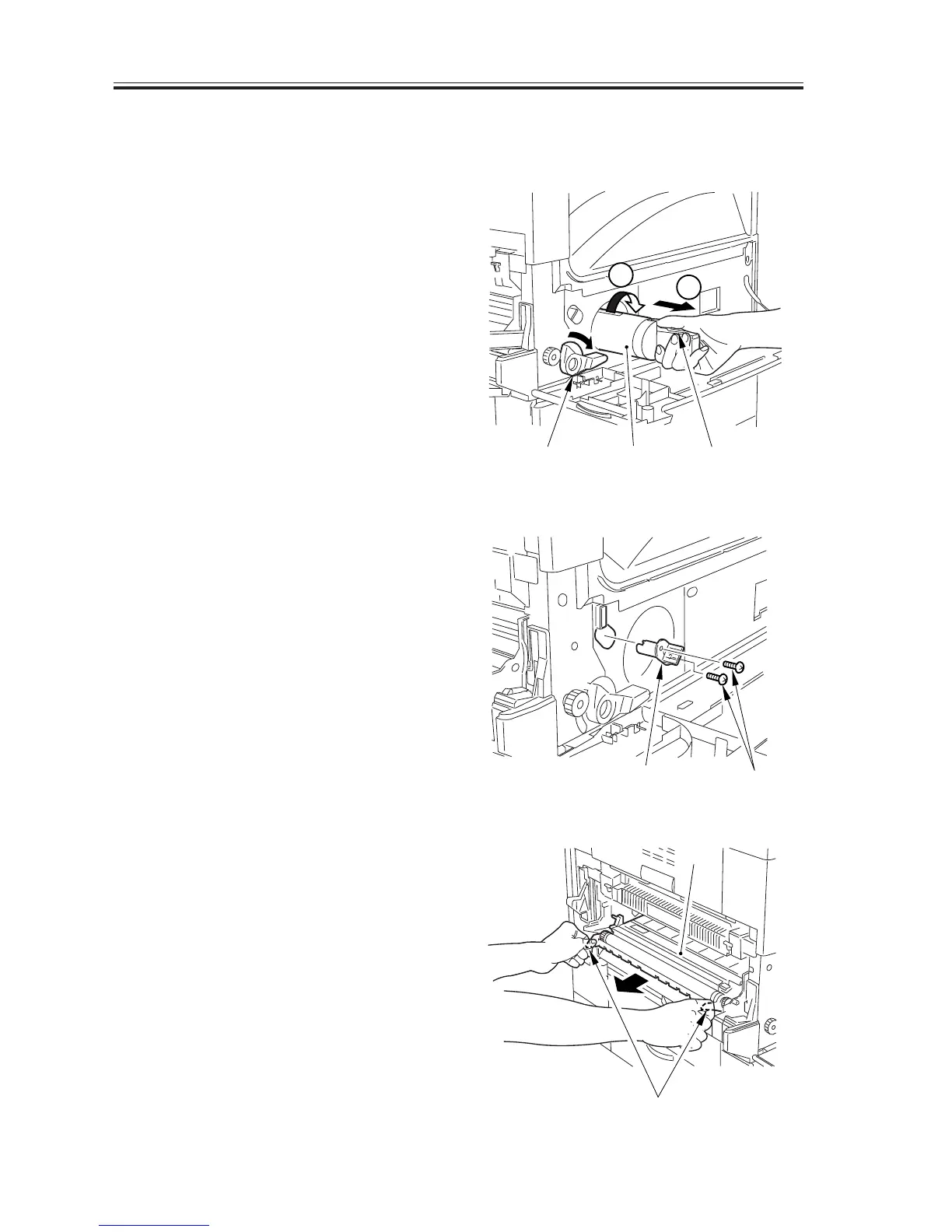
7.2.1 Removing the Developing Assembly
1) Remove the left cover.
2) Open the front cover, and shift down the
developing assembly locking lever [1].
While pushing on the protrusion of the
toner cartridge, turn the grip fully
clockwise, and pull out the toner car-
tridge [2].
3) Turn the developing assembly locking
lever [3] clock wise to unlock.
F05-702-01
4) Take out the drum unit (7.1.1 in Chapter
5)
5) Remove the multifeeder tray. (5.2.1 in
Chapter 6)
6) Remove the two screws [4], and detach
the shaft guide [5].
F05-702-02
7) Holding the grips [6], slowly pull out
the developing assembly [7].
F05-702-03
[3] [2] [1]
1
2
[4]
[5]
[7]
[6]


 To Next Page
 Loading...






