COPYRIGHT
©
2002 CANON INC. 2000 CANON iR1600/iR2000 REV.1 JAN. 2002
6-24
CHAPTER 6 PICKUP/FEDING SYSTEM
5.2 Multifeeder Tray Assembly
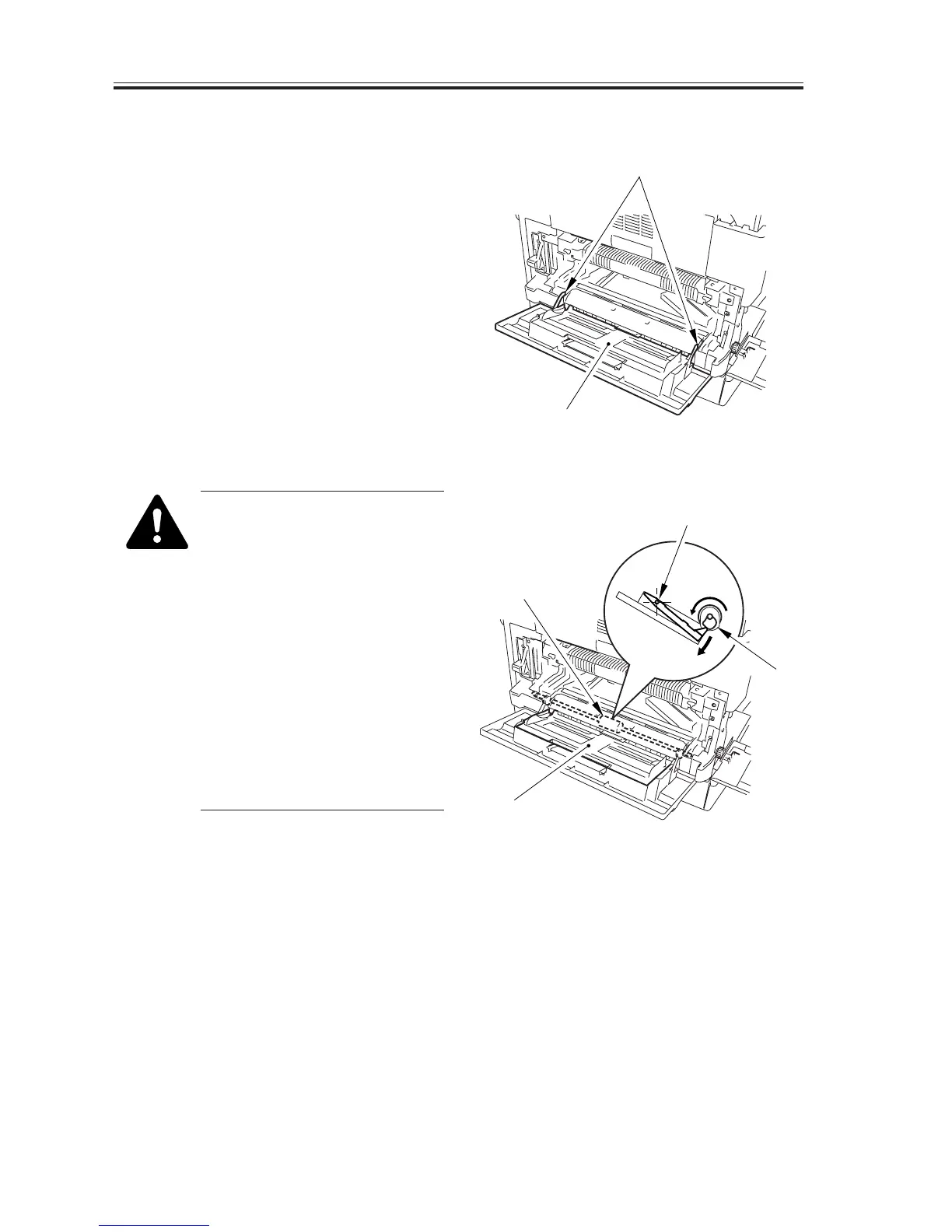
5.2.1 Removing the Multifeeder Tray
1) Remove the left cover.
2) Free the 2 hooks [1], and detach the
multifeeder tray [2].
F06-502-01
After mounting the multifeeder
tray, check to make sure that the
holding plate [4] is pushed
down by the manual feed
pickup roller cam [3].
· If the holding plate is up, push
down the holding plate and,
while doing so, rotate the
manual feed pickup roller [5]
using lint-free paper (so as not
to come into direct contact with
its surface) until the holding
plate is in low position (by the
manual feed roller cam).
F06-502-02
[2]
[1]
[3]
[4]
[4]
[5]


 To Next Page
 Loading...






