190-01115-01 G3X™/G3X Touch™ Avionics Installation Manual
Rev. AV Page 30-83
30.4.10.6 Autopilot Setup
The next phase of setting up the Garmin autopilot system is to verify the proper functionality of the
autopilot system on the ground in normal mode. This phase of the checkout requires a valid aircraft
heading and pitch output from the ADAHRS. This means the post installation procedures must have
already been completed on the ADAHRS before performing the on ground autopilot normal mode
checkout.
NOTE
The following procedure can be performed using either the GMC Mode Controller
controls or the available mode controls on the AP control page of the PFD.
1. Leave the autopilot disengaged and verify the controls can be manipulated smoothly with no
control system binding.
2. Press the AP button to engage the autopilot in ROLL and PITCH modes, then press HDG to
engage HDG mode laterally.
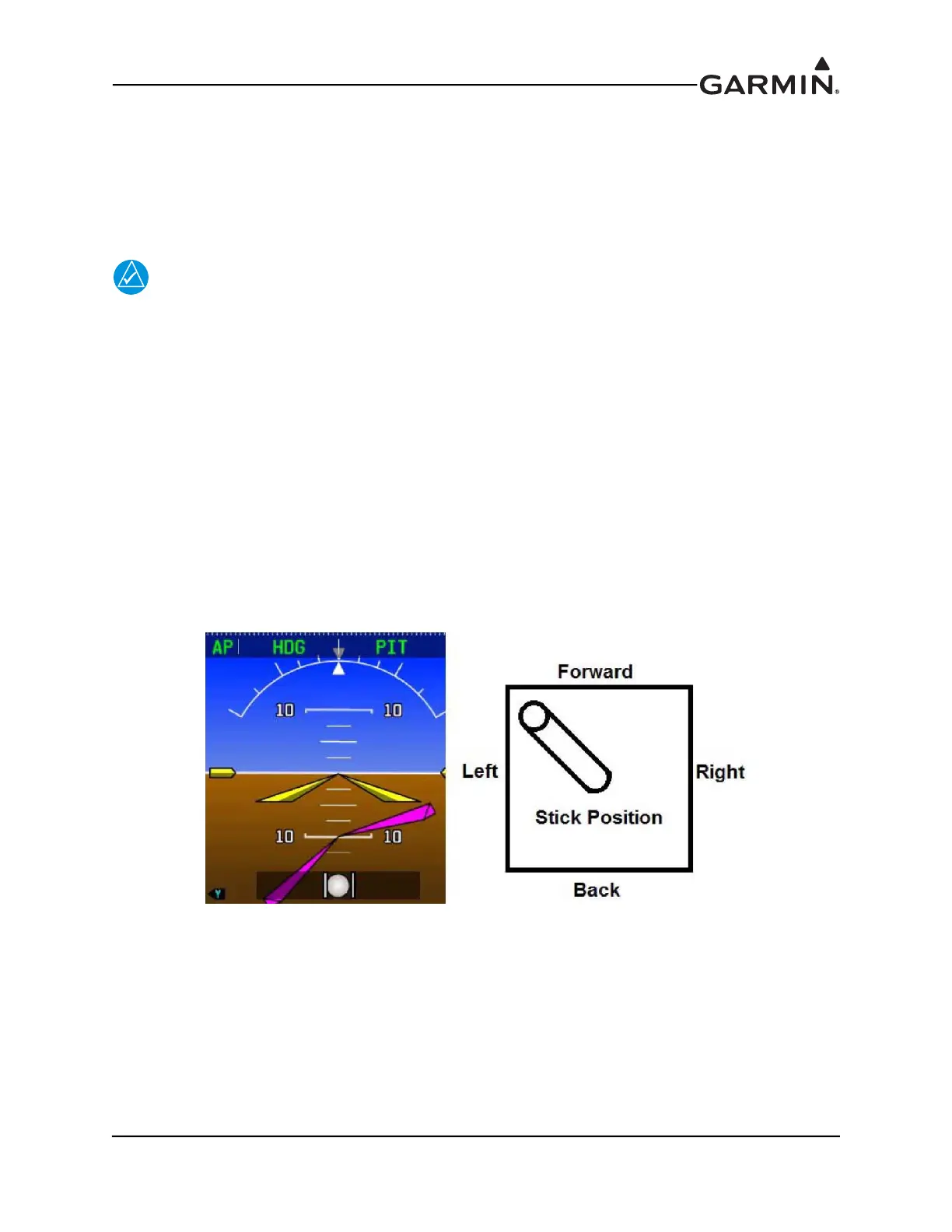
3. Command a nose down, left bank (per the following).
a) Press the Heading knob on the PFD to center the HDG bug
b) Turn the Heading knob on the PFD counter-clockwise to command a left turn
c) Use the Nose Down button or the wheel on the GMC Mode Controller to command a pitch
down
4. Verify the stick properly moves in a direction that would cause the aircraft to pitch down and roll
to the left smoothly with no control system binding.
Figure 30-29 Nose Down, Left Bank


 To Next Page
 Loading...












