190-01115-01 G3X™/G3X Touch™ Avionics Installation Manual
Rev. AV Page 30-130
30.4.13.5 Step by Step Trim System Setup
On-ground Setup
After setting up and testing the GSA 28 based autopilot and yaw damper systems, the pilot can configure
the trim system.
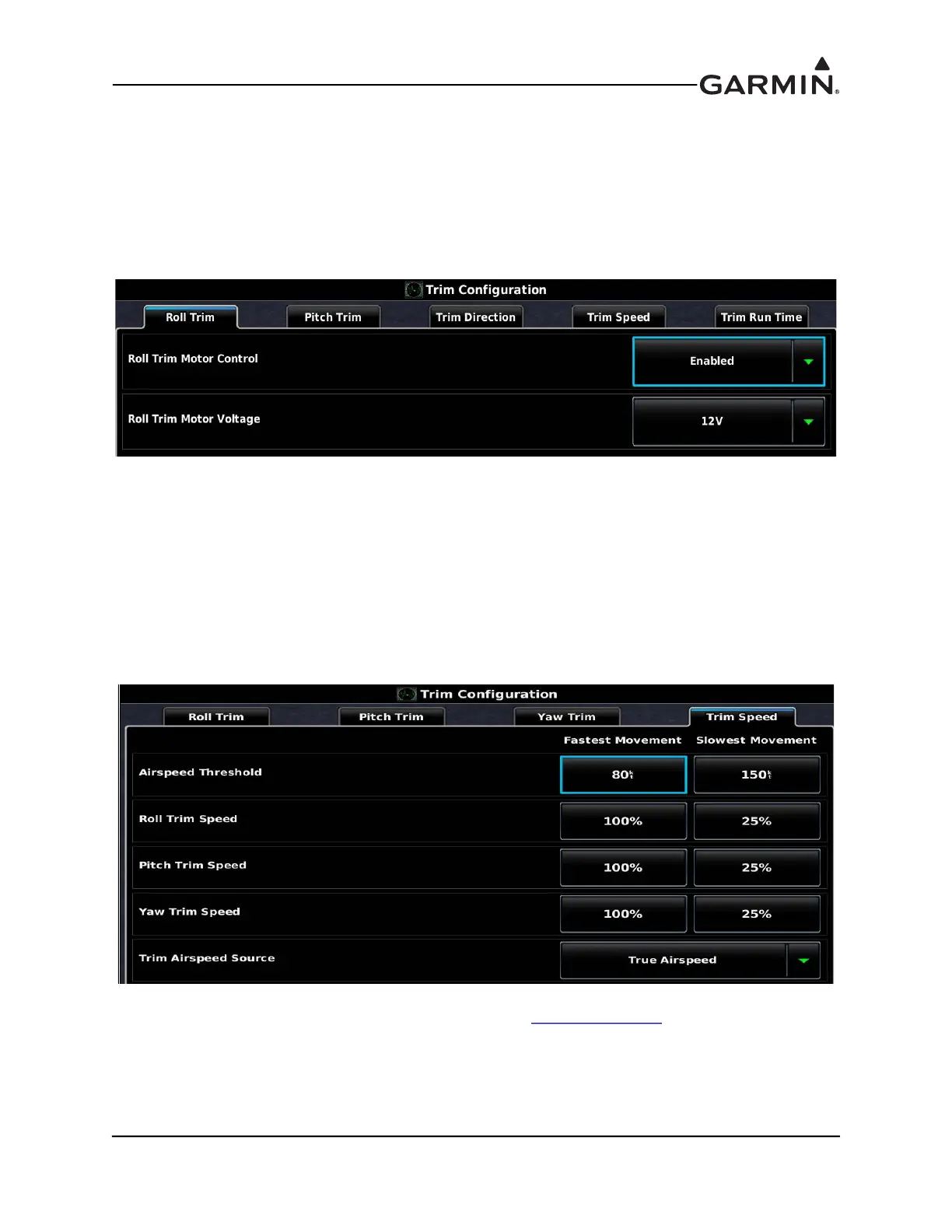
1. Go to the Trim Configuration page and enable the Trim Motor Control for all servos that are
connected to auxiliary trim motors.
2. Select the Trim Speed tab of the Trim Configuration page and set the airspeed thresholds for
fastest and slowest trim movement.
a) Recommend setting the fastest movement airspeed to the airspeed typically used to fly the
normal aircraft landing pattern.
b) Recommend setting the slowest movement airspeed to the airspeed typically used for cruise
flight.
c) Recommend setting the fastest motor speed 100% (will be adjusted later in flight)
d) Recommend setting the slowest motor speed to 25% (will be adjusted later in flight)
3. Re-verify proper trim movement in described in Section 30.4.10.5 Steps 6, 7, & 8.


 To Next Page
 Loading...












