190-01115-01 G3X™/G3X Touch™ Avionics Installation Manual
Rev. AV Page H-92
H.4.7 FD (Flight Director) Configuration Page
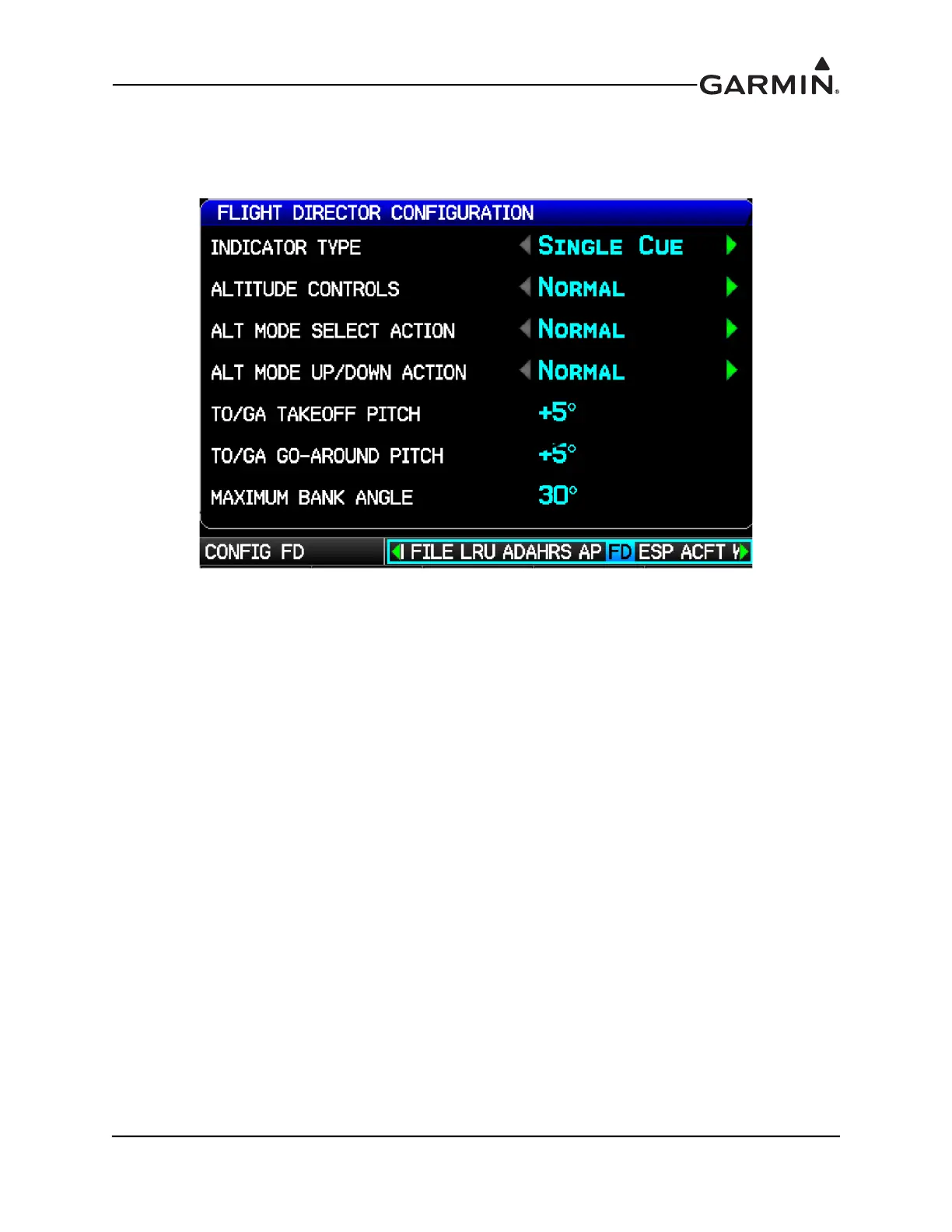
This page (Figure H-30) allows configuration of certain options for the flight director, it will only appear in
installations that include an autopilot.
Figure H-30 Altitude Controls, Normal
Indicator Type–Controls whether the flight director command indicator on the PFD uses a single-cue or
dual-cue presentation.
TO/GA Takeoff Pitch and TO/GA Go-Around Pitch–These fields allow customization of the pitch
attitude targets that will be commanded when the flight director is in Takeoff (TO) or Go-Around (GA)
mode to suit the performance characteristics of the aircraft. The default value for both settings is 5 degrees.
These fields will appear only if a discrete input is configured for the AFCS TO/GA function.
Maximum Bank Angle–Used to limit the maximum roll attitude commanded by the flight director for
aircraft that have unusual attitude limitations. This setting should not be adjusted from the default of 30°
except for very high performance aircraft that have bank angle limitations at high speeds.
Altitude Controls–Select Normal (default) or Simplified. Selecting Simplified results in a simpler set of
behaviors for altitude hold mode. See the G3X Pilot's Guide for additional details.
When Altitude Controls is set to Normal, the following two selections (ALT Mode User Select Action and
ALT Mode User Up/Down Action) appear, see Figure H-31:
ALT Mode User Select Action–Select Normal or Sync Alt Bug. This setting controls the actions that
occur when the user selects altitude hold mode by pressing the ALT key on the GMC Mode Controller,
or the ALT softkey on the GDU. When set to Sync Alt Bug, the selected altitude (altitude bug) will be
automatically set to the current aircraft altitude when the user selects altitude hold mode manually by
pressing the ALT key on the GMC Mode Controller or the ALT softkey on the display. See the G3X
Pilot's Guide for additional details.
ALT Mode User Up/Down Action–Select Normal or Select VS (vertical speed) Mode. This setting
controls the actions that occur when the flight director is in altitude hold (ALT) mode and the user
moves the pitch wheel on the GMC Mode Controller, or the FMS Joystick up/down. When set to Select
VS Mode, moving the pitch wheel on the GMC Mode Controller or the FMS Joystick results in a


 To Next Page
 Loading...












