PAPER FEED UNIT OF TRAY 3 (7155/7165)
3-K-2
3 DIS./ASSEMBLY
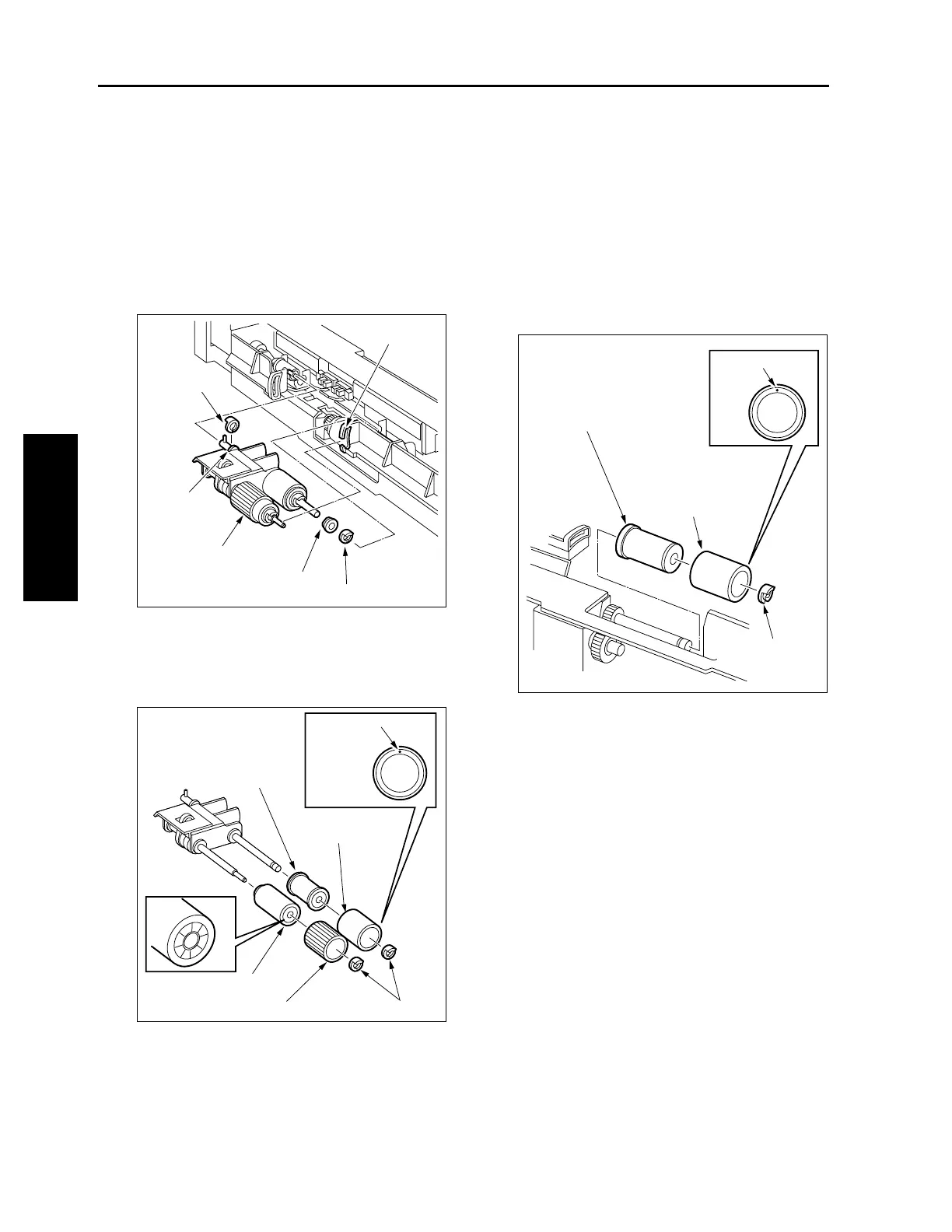
[3] Removing and Reinstalling the Paper
Feed Roller and Feed Roller Rubber
a. Procedure
(1) Remove the paper feed unit.
(2) Remove two stop rings and slide the two bear-
ings outward.
(3) Release the feed roller axis from the holder slit to
detach the paper feed roller unit.
(4) Remove two stop rings from the paper feed roller
unit to detach the paper feed roller and feed
roller.
(5) Remove the rubber from each roller.
(6) Reinstall the above parts following the removal
steps in reverse.
Caution1: When reinstalling the rollers, pay
attention to their orientation.
Caution2: Check that no grease or the like
remains on each roller.
[4] Removing and Reinstalling the DF
Prevention Roller Rubber
a. Procedure
(1) Remove the paper feed unit.
(2) Remove the paper feed roller unit.
(3) Remove the stop ring to detach the double feed
prevention roller.
(4) Remove the double feed prevention roller rubber
from the roller.
(5) Reinstall the above parts following the removal
steps in reverse.
Caution1: When reinstalling the double feed
prevention roller, pay attention to
their orientation.
Caution2: Check that no grease or the like
remains on the double feed preven-
tion roller.
Slit
Stop ring
Stop ring
Bearing
Paper feed roller unit
Bearing
Feed roller
Feed roller rubber
Stop rings
Paint mark
Paper feed roller
Paper feed roller
rubber
Paint mark
Double feed
prevention roller
Double feed
prevention roller
rubber
Stop ring



 To Next Page
 Loading...






