FIXING UNIT
3-O-2
3 DIS./ASSEMBLY
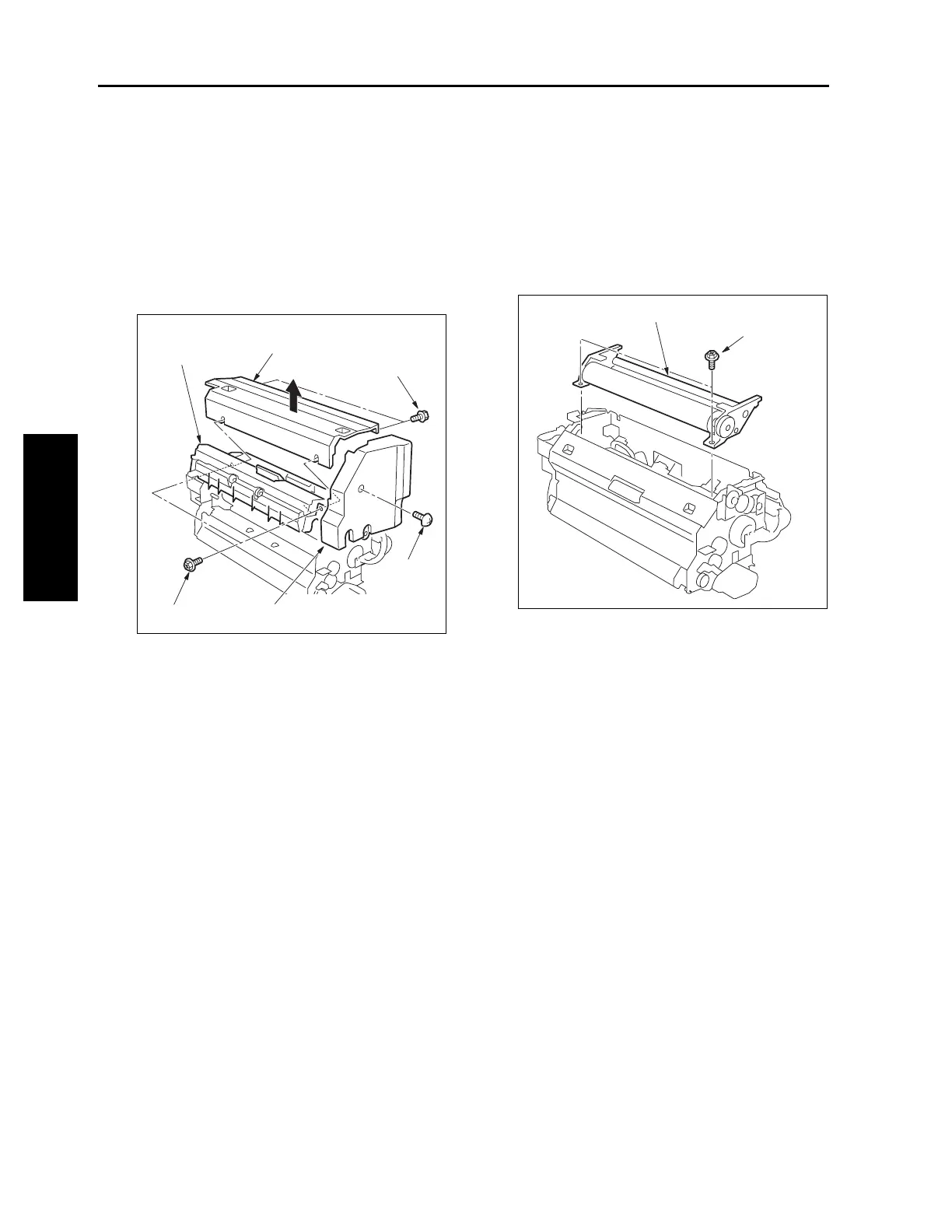
[3] Removing and Reinstalling the Web
Cover
a. Procedure
(1) Remove the fixing unit.
(2) Remove the fixing unit front cover.
(3) Open the fixing separation claw (upper) unit and
remove two screws inside.
(4) Remove two screws to detach the web cover.
(5) Reinstall the above parts following the removal
steps in reverse.
[4] Removing and Reinstalling the
Cleaning Web
a. Procedure
(1) Draw out the ADU stand. (See "ADU UNIT.")
(2) Remove the web cover.
(3) Remove two screws to remove the cleaning web
unit.
(4) Reinstall the above parts following the removal
steps in reverse.
Caution1: When reinstalling, make sure the
cleaning web does not sag.
Caution2: When reinstalling, wind it until the
red line of the cleaning web is fully
wound to the take-up shaft.
Caution3: After replacing the cleaning web,
make sure to reset the count value of
the fixing unit cleaning web by "Copy
Count by Parts to be Replaced
(Fixed Parts)" in the 25 mode.
Fixing separation
claw (upper) unit
Web cover
Screws (2)
Screw
Screws (2)
Fixing unit front cover
Cleaning web unit
Screws (2)



 To Next Page
 Loading...






