FIXING UNIT
3-O-1
3 DIS./ASSEMBLY
FIXING UNIT
[1] Removing and Reinstalling the Fixing
Unit
Warning:
Do not touch the fixing unit immediately
after turning OFF the main power switch
because it is very hot and you may suffer
burns. Wait until the fixing unit has cooled
down sufficiently before working on it.
Caution:
Be sure the power cord has been
unplugged from the wall outlet.
a. Procedure
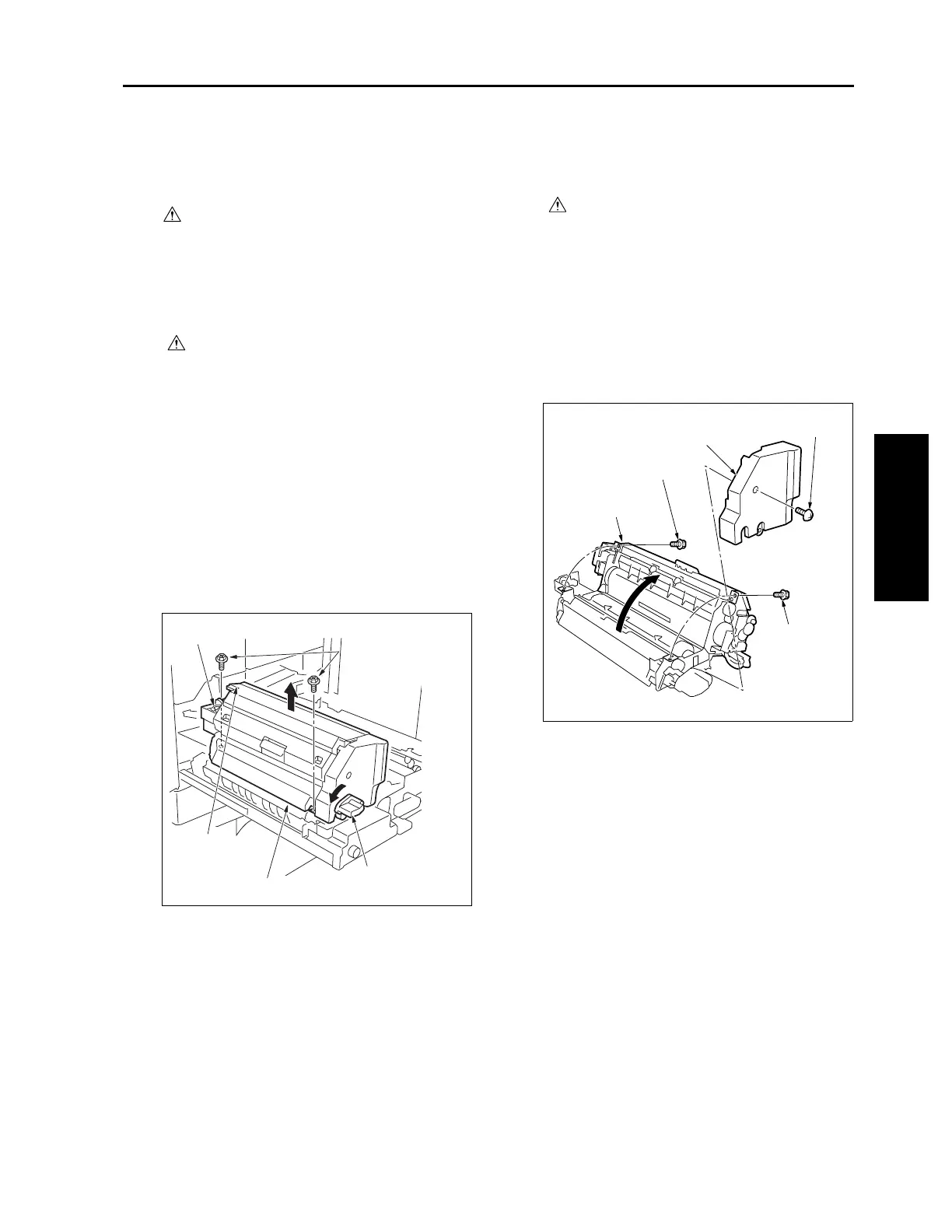
(1) Draw out the ADU stand. (See "ADU UNIT.")
(2) Turn the pressure release lever counterclock-
wise to release the pressure.
(3) Remove two screws and remove the fixing unit
by lifting.
Caution: Do not hold the connector socket.
Remove by holding the pressure
release lever and the holding end at
the far side.
(4) Reinstall the above parts following the removal
steps in reverse.
Caution: After installing the fixing unit, turn the
pressure release lever clockwise and
return it to the original position.
[2] Removing and Reinstalling the Fixing
Unit (Top)
Caution:
Before opening the fixing unit (top), check
that the pressure release lever is turned
counterclockwise and the bottom roller
pressure is released.
a. Procedure
(1) Remove the fixing unit.
(2) Remove one screw to detach the fixing unit front
cover.
(3) Remove two screws to open the fixing unit (top).
(4) Reinstall the above parts following the removal
steps in reverse.
Connector socket
Screws (2)
Fixing unit
holding end
Pressure release
lever
7272ma3030
Screw
Screw
Screw
Fixing unit front cover
Fixing unit (top)



 To Next Page
 Loading...






