OTHER ADJUSTMENT
1 ADJUSTMENT
4
4
b. Adjustment
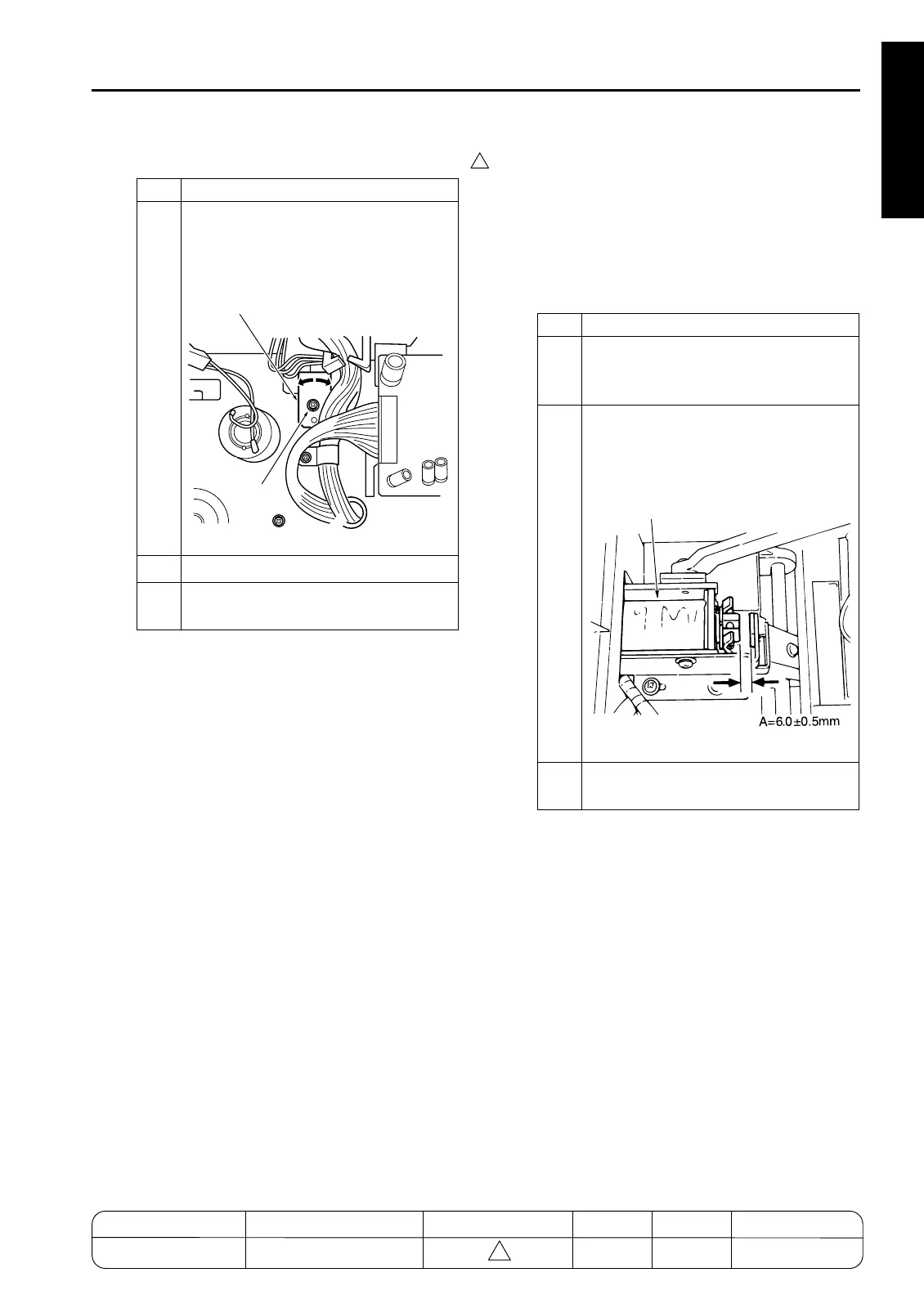
[41] FNS Adjusting the Paper Exit-Open-
ing Solenoid (FS-111)
1. Tool
• Screwdriver (Phillips)
•Scale
2. Adjustment method
a. Preparation
Step Operation
1
Loosen the set screw holding the PS12
(paper exit-opening detector) bracket in
place, and adjust the bracket position as
necessary.
2
Retighten the bracket set screw.
3
Reassemble in the opposite sequence
to removal.
7272fs1035
Screw
Bracket
Step Operation
1
Remove the following parts.
• Rear cover
• Top cover
2
With SD4 (paper exit-opening solenoid)
ON, measure the gap between the sole-
noid plunger and the bracket stopper.
Spec value for gap: A = 6.0 ±0.5mm
3
If the gap is out of spec, carry out adjust-
ment describe as follows.
7272fs1036
SD4 (Exit Opening)
MODEL MANUAL REVISED EDITION DATE PAGE METHOD
SERVICE MANUAL Dec. 2003
7155/7165/7255/7272
1-145 ADDITION



 To Next Page
 Loading...






