CHAPTER 2 NEW FUNCTIONS
2-191
COPYRIGHT
©
2001 CANON INC. 2000 2000 2000 2000 CANON iR8500/7200 REV.1 AUG. 2001
10.4.2 Control Panel
a.Removing the Control Panel (iR8500)
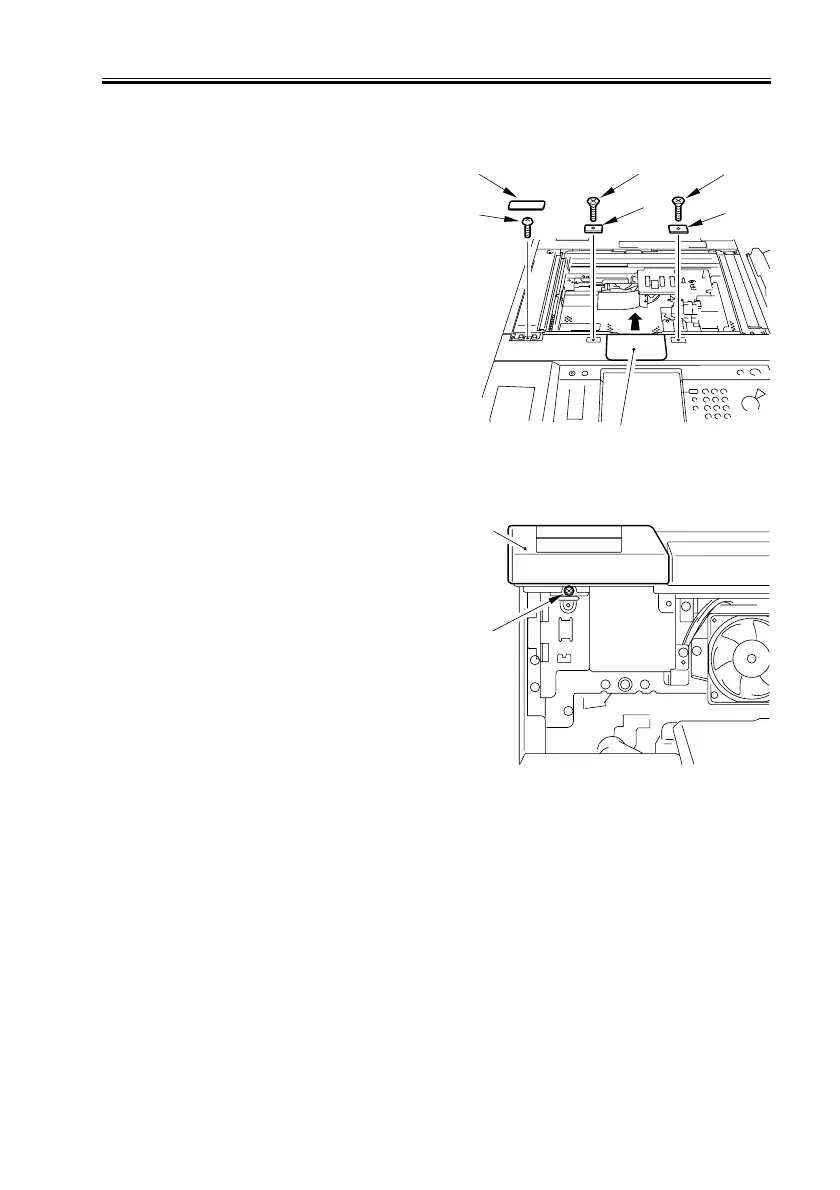
1) Remove the copyboard glass.
2) Remove the scanning lamp cover [1].
3) Remove the flat-head screw [2] (1 pc.
each), and detach the 2 magnet catches
[3].
4) Remove the small cover [4] for the stan-
dard white plate, and remove the screw
[5].
F02-1004-20
5) Remove the inside upper cover (See
10.4.1.i.).
6) Remove the 1 screw [1], and detach the
left upper cover (small) [2].
F02-1004-21
[3]
[3]
[1]
[4]
[5]
[2]
[2]
[2]
[1]


 To Next Page
 Loading...










