CHAPTER 4 INSTALLATION
4-60
COPYRIGHT
©
2001 CANON INC. 2000 2000 2000 2000 CANON iR8500/7200 REV.1 AUG. 2001
5 Installing the Card Reader-D1
5.1 Installing the Card Reader-D1
Go through the following when installing the Card Reader-D1:
No. Work Checks/remarks
1 Start service mode, and make the
following selections:
COPIER>FUNCTION>INSTALLATION>
Card.
Enter the lowest of the numbers of the
cards to use (1 through 2001). As many as
1000 cards starting with the number you
entered my be used.
2 Turn off the copier’s main power switch,
and disconnect the power plug.
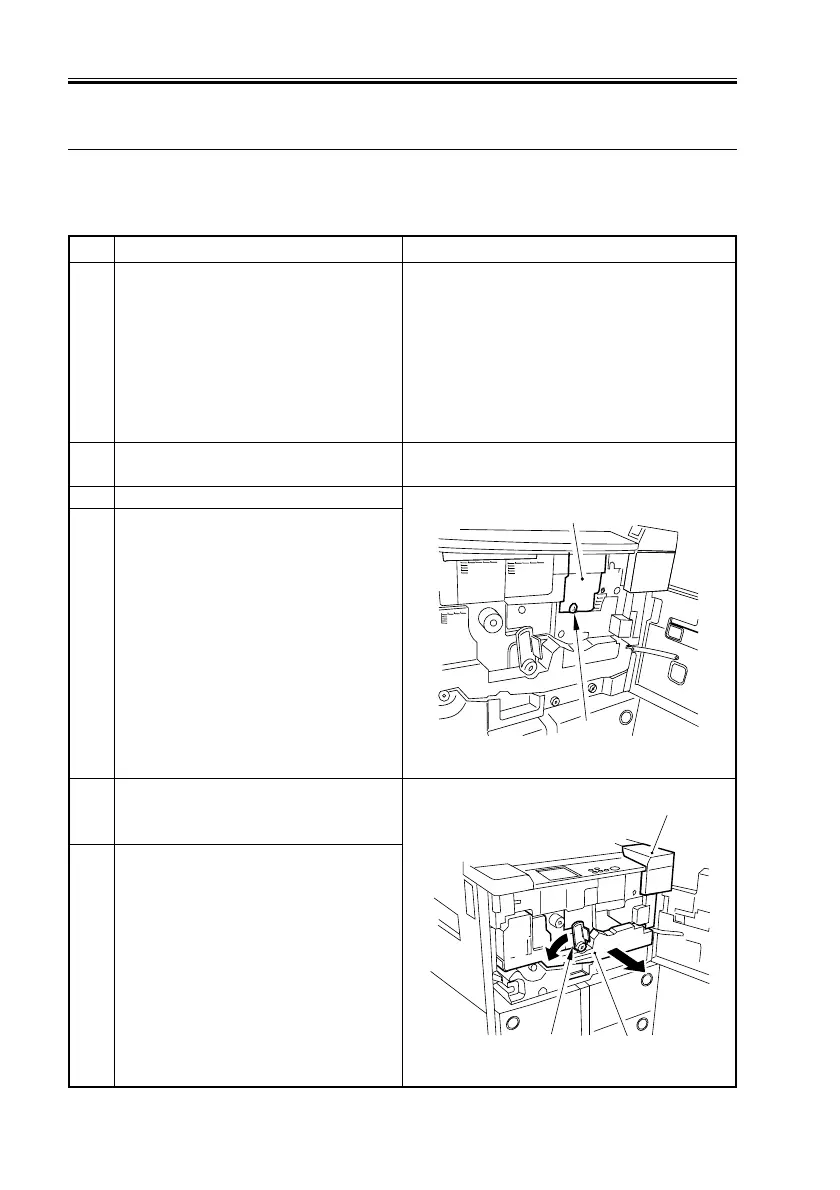
3 Open the front cover.
4 Remove the screw [1], and detach the
primary charging assembly cover [2].
F04-501-01
5 Shift down the fixing/feeding assembly
lever [1], and slide out the fixing/feeding
unit [2].
6 Open the toner cartridge cover [3].
F04-501-02
[1]
[2]
[3]
[2]
[1]


 To Next Page
 Loading...










